 MetaStocker
Stock platforms
How to Review Adobe Stock Auto-Keywords and Fix the First Ten
Adobe Stock automatic keywords can save time, but they are only a draft. The useful question is not whether the generator produced enough words; it is whether the metadata describes the actual image, in the right order, without adding unsupported claims. Adobe Stock gives special importance to the first ten keywords, so a short review of that group can have more practical value than keeping a long list untouched.
Start with what the image proves
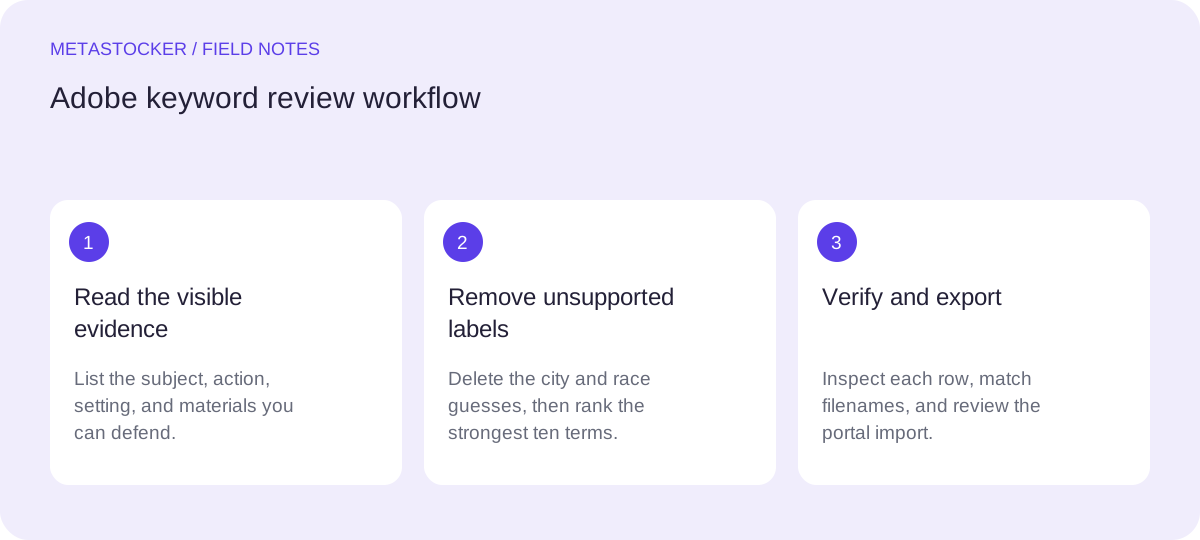
Look at the image as a contributor and write down only visible, defensible facts. For this guide, the subject is a cyclist crossing a wooden bridge. The image can support a cyclist, bicycle, bridge, wood, crossing, outdoors, and perhaps a landscape setting if that setting is genuinely visible. It cannot prove the rider’s name, nationality, event affiliation, city, or whether the crossing belongs to a race.
The metadata language must match the language associated with the contributor account. If the account uses English, review and export English keywords. A Russian-language explanation does not mean that Russian terms should be inserted into an English Adobe Stock submission.
Inspect the automatic draft critically
Treat every generated term as a suggestion. Separate clear subjects from guesses, broad context, and labels that depend on information outside the frame. A city name is usually a location claim, not a visual description. A race label can imply an organized competition, while a single cyclist on a bridge may simply be recreational or commuting activity.
Also look for repetition and near-duplicates. More keywords are not automatically better. Adobe’s general keyword guidance permits up to 49 keywords, but relevance matters more than filling the allowance. Keep terms that add a useful search concept and remove words that merely repeat the same idea.
- Keep visible nouns and actions.
- Question places, events, identities, and intentions.
- Remove repeated or weakly related wording.
Worked example: repair the first ten
Example, not a measured result: suppose the automatic draft begins with cyclist, bike, city, race, bridge, bicycle, outdoors, sport, wood, crossing, river, travel. The image shows no recognizable city and no verified race. Remove city and race. Then choose a sequence that leads with the principal subject and action, followed by the setting and useful visual context.
One defensible ten-term priority sequence is: cyclist, bicycle, bridge, crossing, wooden bridge, outdoors, cycling, sport, river, landscape. The exact final terms still depend on the frame. If no river is visible, omit river. If the image does not clearly show a wider landscape, omit landscape. The point is to preserve accuracy while placing the strongest concepts first.
Notice the tradeoff: cyclist and bicycle overlap, but they can serve different search phrasing. Wooden bridge is more specific than bridge, yet it should not replace bridge if the broader term remains useful. Sport is acceptable only when the visual context supports it; otherwise use a neutral activity term.
Automatic draft: cyclist, bike, city, race, bridge, bicycle, outdoors, sport, wood, crossing, river, travel

Remove: city, race

Priority sequence: cyclist, bicycle, bridge, crossing, wooden bridge, outdoors, cycling, sport, river, landscape
Use a local generator as a drafting aid
MetaStocker can generate local metadata in the visitor’s browser using local vision and thinking models. In local mode, the model runs on the visitor’s device through WebGPU workers; the first model download requires internet. Loading a model into memory is different from retaining downloaded model files in the browser cache, and browser storage can be evicted.
For a single image, begin with one local parallel thread and review the result before trying two. Give batch description context only when it is true for every file in the batch. Extra tags can be placed at selected positions, but each added term still needs per-file review. The app can validate the requested tag count; that does not prove that the tags are accurate.
- Load the model explicitly, then generate a draft.
- Compare every term with the image.
- Unload memory or delete browser model files when appropriate.
Edit before exporting or uploading
Keep the editable result as a working draft until the first ten are correct. Check the title as a natural description rather than a keyword list, and stay within the current Adobe requirements. The CSV workflow maps filenames to titles and keywords, so exact filenames matter when importing. Upload the assets before importing the CSV, then inspect the resulting metadata in the contributor portal.
MetaStocker exports an Adobe CSV, but it does not upload or submit the file, guarantee acceptance, or embed metadata into the original image. Marketplace requirements can change, so check Adobe’s current contributor portal and CSV guidance immediately before submission.
- Confirm the filename, extension, and capitalization.
- Review the title and all keywords in the portal.
- Submit only after correcting unsupported claims.
Keep marketplace metadata separate from website SEO
Adobe Stock search metadata and Google website indexing are different systems. Reordering Adobe keywords does not guarantee Google visibility, marketplace ranking, sales, or revenue. If you also publish the image on your own site, use descriptive surrounding text and appropriate alt text for that page, rather than copying every marketplace keyword into the page.
This separation keeps the workflow honest: the Adobe list describes the asset for the marketplace, while website text explains the image to visitors and search engines.
Before you continue
- Describe only what the image visibly supports.
- Delete the incorrect city and race labels.
- Place the strongest ten terms in priority order.
- Check every added tag for individual relevance.
- Use the contributor account’s metadata language.
- Match filenames exactly in any CSV workflow.
- Inspect imported metadata in Adobe’s portal.
- Recheck current Adobe requirements before submission.
Sources and editorial approach
Prepared with AI assistance. Worked examples are illustrative. Automated checks do not replace checking the requirements of your stock platform. How these guides are made.