 MetaStocker
Titles & keywords
How to Choose Compound Stock Keywords Without Keyword Spam
Compound keywords are short, established combinations that name one recognizable concept: ice cream, coffee cup, copy space, or yellow flower. They can make stock metadata more precise, but only when the words describe something genuinely visible or clearly intended in the image. The mistake is turning every observation into a long keyword chain such as “summer dessert lifestyle food background.” That may sound search-friendly, yet it mixes several ideas and can become irrelevant or repetitive.
This guide shows how to decide when a compound term is useful, when separate words are better, and how to adapt the result to a stock platform’s rules. The goal is a small, defensible set of phrases that helps internal marketplace search understand the file. It is not a promise of higher ranking or sales. Website Google indexing is a separate subject with different signals and should not be confused with marketplace metadata.
What makes a compound keyword legitimate
A compound keyword usually names a familiar object, subject, visual property, or use concept. “Ice cream” identifies a dessert; “coffee cup” identifies a type of object; “copy space” describes an intentional area suitable for text. “Yellow flower” combines a visible color and subject without pretending to identify a species.
The useful test is simple: could another contributor or buyer understand the phrase immediately, and can you point to the evidence in the file? If yes, keep it. If the phrase only exists because several nearby words were joined for search coverage, split it into accurate concepts or remove it.
- Keep established phrases that express one clear concept.
- Use separate keywords for independent subjects, colors, settings, and actions.
- Do not infer a flower species, person, location, ownership, or release from pixels.
Strong: ice cream, dessert, cone.
Weak: ice cream summer dessert lifestyle advertising background concept.
Separate description from phrase invention
A descriptive title or sentence should read naturally. Keyword fields can contain individual terms and established compounds, but they should not become a hidden sentence or a catalogue of every possible combination. “Coffee cup on a wooden table” can be a useful description; it does not mean that every pair of words—coffee wooden, cup table, wooden coffee—deserves a keyword.
Ask what a buyer would actually search for. A buyer may search for “copy space” because it is a recognized design need. They are less likely to search for an invented chain such as “copy space minimal clean empty room wall.” Keep “copy space,” then add only the visible context that matters, such as wall, table, or background.
- Write the title as a natural description.
- Reserve keyword phrases for established or clearly meaningful combinations.
- Delete repeated variants that add no new information.
Worked example: one image, four decisions
Example: imagine a flat-lay photograph of a single scoop of ice cream in a small yellow bowl, placed on a pale blue surface with open space on the right for text. The image does not reveal a brand, exact location, or flavor beyond what is visually supportable.
Start with the subject: ice cream, dessert, scoop, bowl. Add visible attributes: yellow, blue, food. Add the functional concept: copy space, but only if the empty area is intentionally usable and visually clear. Do not add “summer vacation,” “children’s party,” or “premium restaurant” unless the image provides that context.
The tradeoff is coverage versus accuracy. “Yellow bowl” may be defensible if the bowl is clearly yellow, while “yellow flower” would be wrong even if a flower appears in another file from the same batch. A phrase is not reusable merely because it worked on a neighboring image.
- Confirm each compound against this file, not the batch in general.
- Keep the strongest subject phrases near the front where the platform prioritizes them.
- Treat functional terms such as copy space as visual claims requiring review.
Possible metadata set:
Title: Ice cream in yellow bowl with copy space
Keywords: ice cream, dessert, scoop, bowl, yellow bowl, food, blue background, copy space, flat lay
Adapt to platform limits and language
Platform rules differ. Adobe’s keyword guidance allows up to 49 keywords and emphasizes the most important terms, especially early in the list. Its metadata language must match the contributor account. If the account is set to English, the example metadata can remain English even when this article is read in Russian. Check the current contributor requirements before exporting or uploading.
Envato allows relevant established compound terms for photos and video, but limits and requirements vary by content type. Do not assume a photo rule applies to another item type. A conservative list is easier to review than a maximum-length list filled with weak combinations.
Marketplace search is not the same as Google website search. A stock platform interprets the metadata attached to an item; Google may use page text, image context, alt text, and other website signals. Changing a marketplace keyword does not control how a website is indexed.
- Check the current item-specific portal rules before submission.
- Match the required metadata language and keep filenames separate from keyword logic.
- Use only the number of terms needed to describe the work accurately.
Use a generator as a draft, not a verdict
MetaStocker can generate local metadata in the browser and export formats including Adobe and Envato CSV. In local mode, model inference stays on the visitor’s device; the first model download needs internet. The app can validate a requested tag count, but that confirms quantity rather than accuracy.
For a batch, use the description field only for facts shared by every file. Do not tell the generator that every image is food, yellow, or copy space when those details vary. Extra tags still need per-file review. Open each result, remove invented compounds, and keep only rows ready for export. The exporter does not upload or submit files, and the contributor portal remains the place to inspect imported metadata.
- Generate a draft with factual batch context.
- Review compounds file by file.
- Export only after checking relevance, language, and platform limits.
A repeatable editing pass
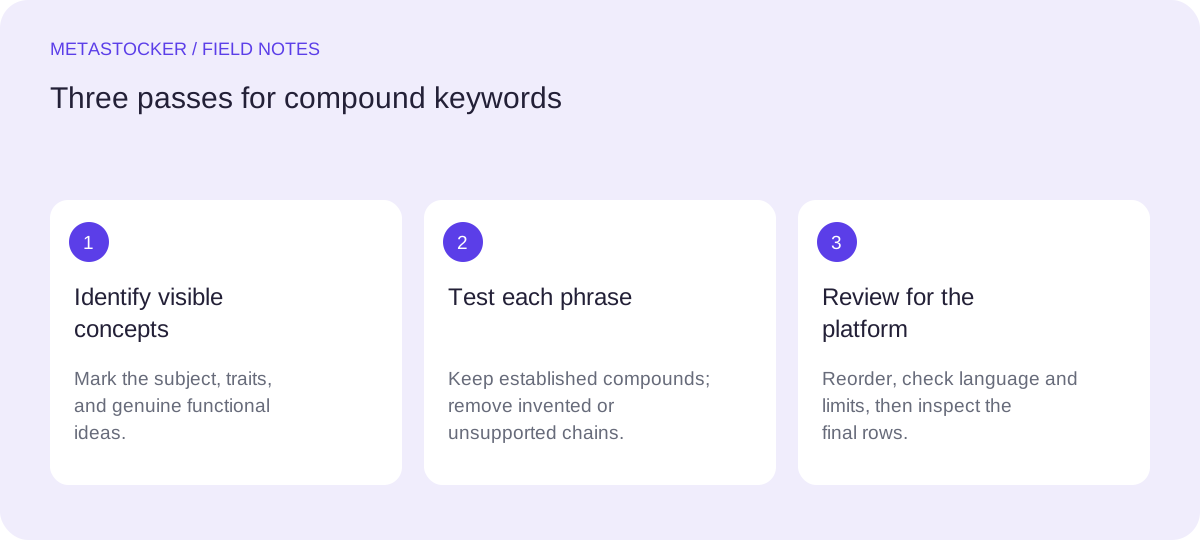
Use a three-pass workflow. First, mark the obvious subject and any established compound. Second, test every phrase against visible evidence and the intended use. Third, reorder the strongest terms and remove duplicates, speculative context, and awkward chains.
Read the final title aloud. Then read the keywords as if you were buying the file. If a phrase would mislead a buyer, it does not belong, even if it sounds commercially attractive. Contributor portals and policies can change, so verify the current rules at the point of upload.
- Circle the main subject and functional concept.
- Challenge every adjective and inferred context.
- Recheck the portal rules before final export.
Before you continue
- Does every compound name one clear, established concept?
- Can you support each term from this specific file?
- Have you removed invented chains, repetition, and speculative context?
- Are the strongest terms placed early where the platform prioritizes them?
- Does the language and keyword count match the current platform rules?
- Did you inspect the exported or imported metadata before submission?
Sources and editorial approach
Prepared with AI assistance. Worked examples are illustrative. Automated checks do not replace checking the requirements of your stock platform. How these guides are made.