 MetaStocker
Titles & keywords
How to Describe a Seamless Stock Video Loop
The word “seamless” is a technical promise, not decorative wording. For a stock video, use it only after watching the clip from its final frame back to its first frame and checking that the transition does not reveal a jump, flash, change of speed, or obvious color break. This guide uses one hypothetical example throughout: an 8-second animated gradient loop with no people, objects, physical location, or ownership information supplied in the shoot notes. The example is not a measured customer result. It shows how to turn a playback decision into careful metadata for a stock marketplace.
Start with the supplied facts
Before writing a title or keyword, record what the shoot notes actually establish. In this assignment, they establish an animated gradient loop. They do not establish a physical material, a studio, a city, a product, a person, or a color palette beyond what you can verify while viewing the file.
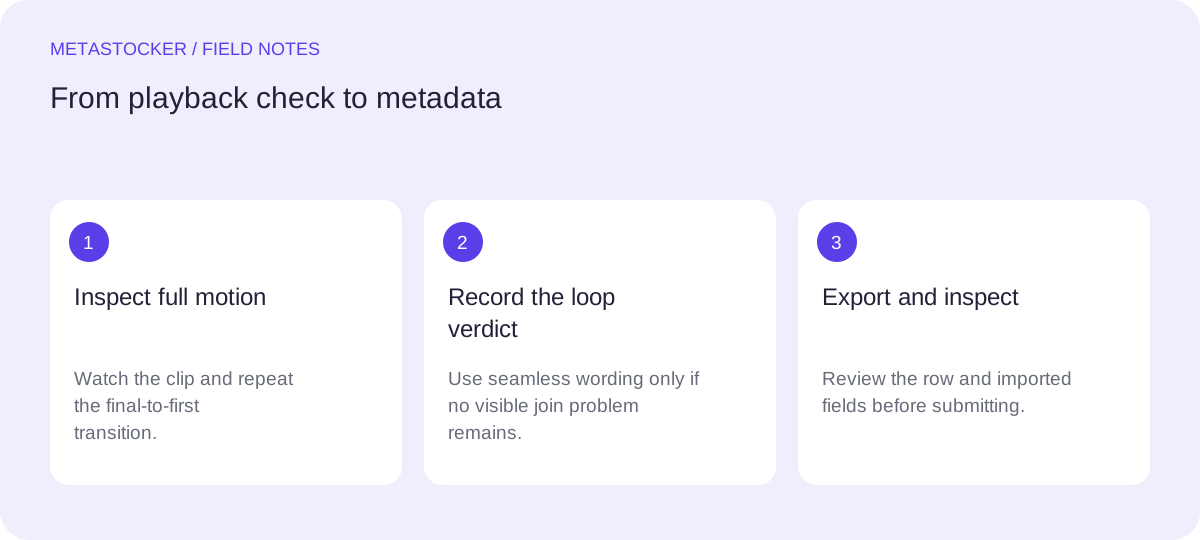
Watch the entire video at normal speed. Then inspect the final-to-first transition repeatedly. A thumbnail or a few sampled previews can suggest motion, but it cannot replace human inspection of the full clip. Do not call a clip seamless because it contains a repeating-looking gradient.
- Known: animated gradient and intended loop presentation.
- Unknown: physical ingredients, ownership, location, people, or brand identity.
- Decision required: whether the end joins the beginning cleanly.
Shoot note: “Animated gradient loop.”
Safe starting fact: “Abstract animated gradient background.”
Test the end-to-start join
Use a simple three-pass review. First, play the full clip without pausing. Second, place the playhead near the last frame and watch the cut into the first frame several times. Third, check the same join at normal playback speed and at a slower inspection speed if your editor allows it. Look for a brightness jump, a direction reversal, a stalled shape, a hard edge, or a visible reset.
A loop can be useful even when it is not seamless. If the transition is visible but intentional, describe it as an animated gradient or abstract motion background and omit seamless loop language. Accuracy matters more than adding a popular phrase.
- Check motion continuity, not only matching colors.
- Check the first and last frames for a visible reset.
- Record the decision per file; do not apply one verdict to a mixed batch.
Hypothetical review: the 8-second gradient repeats with the same apparent motion at the join and shows no visible flash or pause. It may be described as seamless only after that inspection.
Build a descriptive title
Write a phrase that identifies what the buyer receives. Put the clearest subject and format information first, while avoiding a title made from disconnected keywords. For the worked example, “Seamless animated gradient loop background with flowing abstract color” describes the visual, the motion, and the intended background use.
The title should not claim a location, material, person, or production detail that was not supplied or verified. Do not add camera settings or a trademark simply to make the line sound technical. If the loop check fails, remove “seamless” and “loop” or revise them to match what the playback actually shows.
- Lead with the visual subject: animated gradient.
- Use loop terminology only after the playback check.
- Keep the title readable as a phrase, not a keyword list.
Verified hypothetical title: “Seamless animated gradient loop background with flowing abstract color”
Choose keywords for the individual clip
Make every keyword earn its place by describing this file or a directly relevant use. A useful set for the example can include animated, gradient, abstract, background, motion, colorful, flowing, loop, seamless, and texture. “Texture” should remain only if the visible treatment genuinely supports that interpretation; do not add unrelated subjects or broad tags merely to increase coverage.
Platform rules differ. Adobe’s guidance permits up to 49 keywords and emphasizes the first ten, while Shutterstock’s current guidance says to use 7 to 50 relevant keywords. These are platform requirements to recheck in the contributor portal, not a reason to fill every available slot. Metadata language must also follow the relevant account or marketplace rules.
- Put the most important relevant terms early where the platform considers order.
- Remove duplicates, near-duplicates, and unsupported concepts.
- Keep marketplace metadata separate from website SEO metadata.
Hypothetical keyword order: animated, gradient, abstract, background, motion, colorful, flowing, loop, seamless, texture
Use local generation as a draft aid
MetaStocker’s local mode can generate draft metadata in the browser using its supported local models and WebGPU workers. The video workflow is based on sampled previews, so the app cannot replace the full-motion end-to-start check. Review the editable result and keep only rows that are ready for export.
Local execution means inference happens on the visitor’s device. The first model download needs internet; loaded model memory is different from downloaded browser cache. Storage can be evicted, and closing the tab can lose work. The exporter creates formats such as Adobe, Envato, and Shutterstock CSV, but it does not upload, submit, guarantee acceptance, or embed metadata into the original video.
- Give a mixed batch only factual, batch-wide context.
- Use extra tags carefully and review them per file.
- Start with one local parallel thread before testing another.
For this single hypothetical clip, context could say: “Abstract animated gradient video intended as a background; verify loop wording from full playback.”
Prepare and inspect the submission
Export only after the title and keywords agree with the playback decision. If using a CSV workflow, upload the assets first, then import the CSV, and make sure each filename—including extension and case—matches exactly. Inspect the resulting metadata in the contributor portal rather than treating the export as proof that the marketplace accepted it.
If the platform asks for a different field structure or keyword limit, follow its current contributor instructions. A CSV is a transfer format, not a guarantee of approval. For a website, descriptive surrounding text and alt text serve Google image discovery; that is separate from internal stock-marketplace search and should not be presented as the same optimization task.
- Confirm the loop verdict before export.
- Match exact filenames and inspect imported fields.
- Check current portal policies because marketplace requirements change.
Final hypothetical row: gradient-loop-01.mp4 | Seamless animated gradient loop background with flowing abstract color | animated, gradient, abstract, background, motion, colorful, flowing, loop, seamless, texture
Before you continue
- Watch the complete video, including the end-to-start transition.
- Use “seamless” only when the join passes visual inspection.
- State only supplied or visibly verified facts.
- Write a readable title instead of a keyword list.
- Keep keywords relevant to this individual clip and order the strongest terms early.
- Review generated metadata and imported CSV fields in the contributor portal.
- Recheck current platform limits and policies before submission.
Sources and editorial approach
Prepared with AI assistance. Worked examples are illustrative. Automated checks do not replace checking the requirements of your stock platform. How these guides are made.