 MetaStocker
Local AI
Thinking Mode in Local Metadata Generation: What to Review
When a local metadata generator appears to “think,” it is easy to assume that you can inspect its reasoning, choose how much reasoning it uses, or export the reasoning with the result. MetaStocker works differently. Every request sent to a local model uses thinking automatically. The app has no thinking switch, no standard-mode control, and no manual selector for reasoning tokens. The useful question is therefore not how to turn thinking on or off, but how to review the final title, description and keywords that thinking produces.
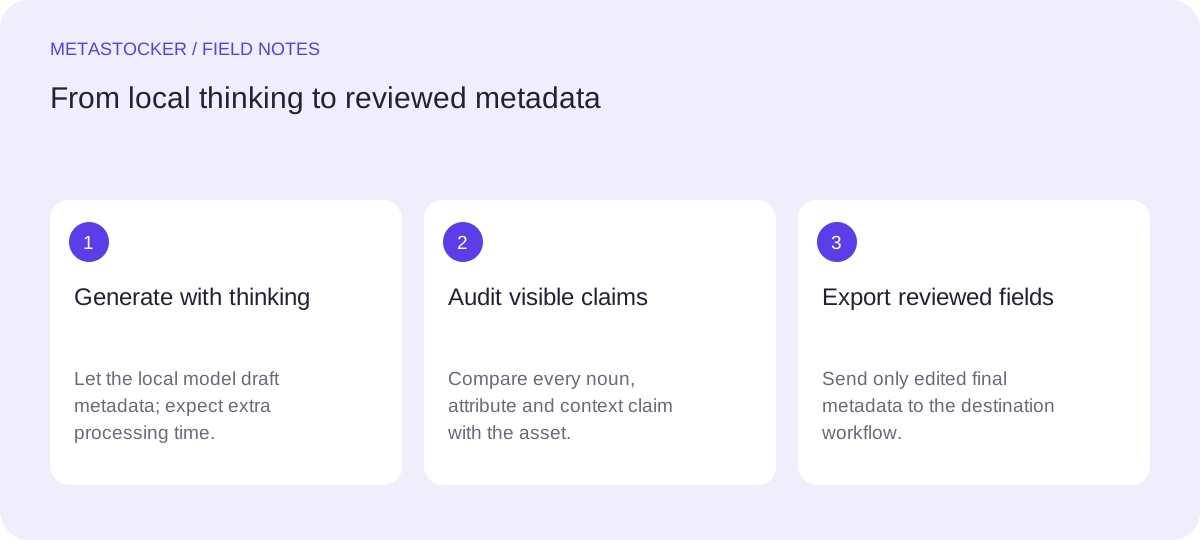
Thinking can help a model connect visual clues into a usable description, but it consumes additional generation time and does not make an answer factually reliable. Intermediate reasoning is not exported. Only the parsed final metadata reaches the editable result and, if you choose, the CSV exporter. Treat the model as a drafting assistant and make the final decisions yourself.
What thinking mode actually does
MetaStocker’s local models—Gemma 4 E2B, Gemma 4 E4B and Qwen3.5 2B—run in the browser through WebGPU workers. Thinking is enabled for every local model request, including requests made with the default Gemma E2B model.
There is no control for switching to a standard mode or selecting a reasoning-token budget manually. Qwen has a bounded reasoning budget, but that boundary is not an accuracy promise. More internal work can also mean more waiting, especially on a device with limited GPU resources.
- Reasoning happens locally in the visitor’s browser.
- The intermediate reasoning is not shown as exported metadata.
- The final result remains editable before export.
Example: if a preview shows a ceramic mug beside a notebook, thinking may help the model connect the objects into a coherent scene description. It may still invent a material, location or intended use.
What is exported—and what is not
The exporter parses only the final metadata fields. It does not export hidden reasoning or a chain-of-thought transcript. You receive the final title, description and tags in the app’s editable results, then can export a format such as Adobe, Envato, Shutterstock or Freepik CSV.
Export is a preparation step, not a submission. MetaStocker does not upload the CSV, submit it to a marketplace, guarantee acceptance or embed metadata into the original files. Inspect the completed rows before taking them to a contributor portal.
- Only final parsed fields are exported.
- Hidden reasoning is not a marketplace field.
- A CSV still needs platform-specific checking and upload.
A practical review method
Start by checking nouns: is the main subject identified correctly? Next check attributes such as color, count, material and visible activity. Finally check context: does the wording claim a location, season, identity, event or purpose that the image does not establish? Delete unsupported claims rather than trying to make them sound more precise.
For video, remember that generation uses sampled previews. Watch the full motion yourself before accepting action words, timing or continuity claims. A convincing still frame is not proof of what happens throughout the clip.
- Circle every concrete claim in the final text.
- Keep only details visible or supplied as reliable context.
- Remove guessed identities, ownership, releases, locations and species.
Worked example: correcting a plausible draft
Consider this hypothetical example: a contributor previews a flat-lay photograph of a blue notebook, a pencil and a coffee cup on a wooden desk. The local model returns a title suggesting “remote work planning,” keywords for “office,” “morning routine” and “student,” and a description saying the coffee belongs to a freelancer.
The image supports a desk scene, notebook, pencil, cup and blue color. It does not prove the person’s occupation, the time of day, the viewer’s role or whether the cup contains coffee. A careful edit preserves useful discoverability while removing invented context.
- Retain: blue notebook, pencil, cup, wooden desk, flat lay.
- Remove: freelancer, student, remote work, morning and coffee unless confirmed.
- Put the strongest accurate terms first.
Hypothetical corrected metadata
Title: Blue notebook, pencil and cup on wooden desk
Keywords: notebook, blue, pencil, cup, wooden desk, stationery, writing, workspace, flat lay, planning
Description: Blue notebook, pencil and cup arranged on a wooden desk in a flat-lay composition.
Match the destination’s rules
Review the target marketplace’s current contributor requirements after editing. For Adobe Stock, relevant terms should lead the metadata, with special attention to the first ten keywords; the general keyword guidance permits up to 49, while CSV requirements should still be checked at upload time. The account’s metadata language must match the contributor account.
Do not confuse marketplace search with Google website indexing. Keywords for a stock platform help describe an asset inside that platform. Website image SEO involves surrounding text and appropriate alt text, and neither guarantees indexing or ranking.
- Use English metadata when the target platform requires English.
- Avoid repeated or irrelevant tags.
- Check current portal limits and inspect the imported fields.
A safer local workflow
Download and load a model explicitly, begin with one local parallel thread, and test additional threads only if your device handles them comfortably. Model memory is not the same as a downloaded browser cache: cached files may be evicted, and local storage does not promise permanent offline availability.
Generate in small batches when the images differ substantially. Batch description is context sent with generation, so use factual shared information rather than broad tags that apply only to some files. Review each file’s tags, edit questionable rows, and export only rows you consider ready.
- Confirm the image or readable preview is available.
- Use factual batch context and file-specific corrections.
- Keep the final review with the contributor, not the model.
Before you continue
- Remember that thinking is always enabled for local requests.
- Do not look for a nonexistent standard-mode switch or token selector.
- Review every factual claim in the final metadata.
- Inspect video across its full motion, not only sampled previews.
- Remove guesses about identity, ownership, releases, location and species.
- Check the destination marketplace’s current rules before upload.
- Export only edited rows that you are prepared to verify yourself.
Sources and editorial approach
Prepared with AI assistance. Worked examples are illustrative. Automated checks do not replace checking the requirements of your stock platform. How these guides are made.