 MetaStocker
Local AI
What Is an OpenAI API Key and Why Do You Need One?
An OpenAI API key is a secret credential that an application uses to authenticate requests to the OpenAI API. It connects those requests with the relevant developer account or project and its permissions and usage. The key is not an AI model, a ChatGPT password or a prepaid package of answers.
You may encounter an API key field in a photo tool, automation script or other application that asks you to use your own OpenAI access. This guide explains what that field means and whether you need it. The OpenAI documentation and MetaStocker implementation were checked on October 2, 2026.
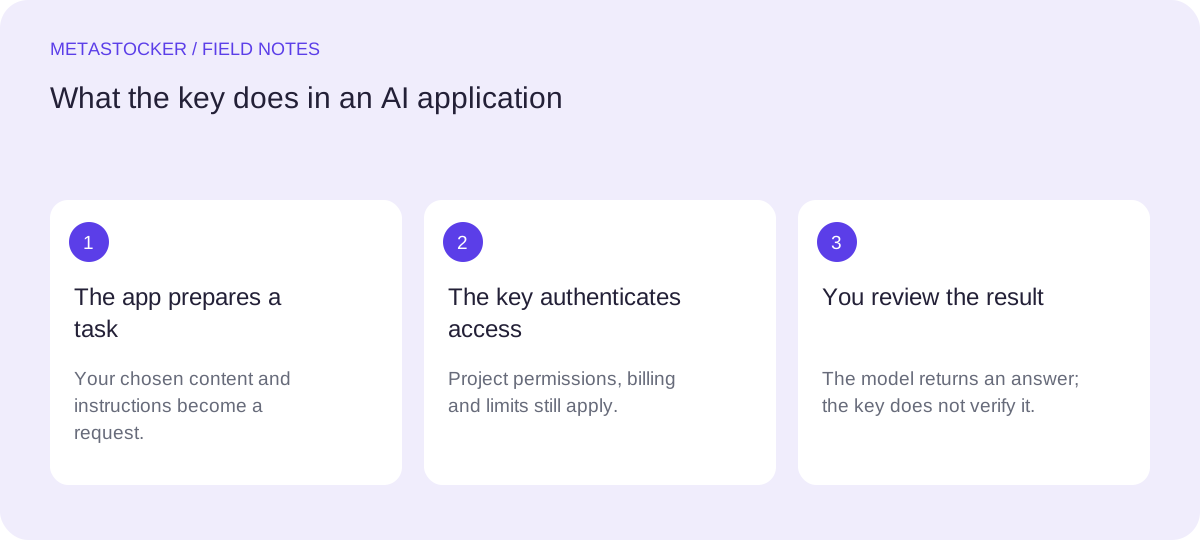
1. A key is an access credential for a program
API stands for application programming interface: a way for one program to communicate with another service. Instead of you opening a chat and typing each message, an application sends a structured request and receives a response. An API key is one way to authenticate that request.
Think of the key as a pass for a particular service, with an important limit to the analogy: what it can do depends on permissions and the associated project. Possessing a key does not give unlimited access to every model or feature, remove request limits or guarantee that billing is ready.
- The application supplies a request; the key authenticates it.
- The model processes the request; the key is not the model.
- Account settings determine access, usage controls and billing.
2. What happens when an application uses your key
Consider an application that describes a product photo. You choose an image and provide context. The application prepares the information needed for a model request and sends that request with API authentication. OpenAI checks access and, if the request is accepted, returns the model's result. The application then shows or processes the answer.
The key identifies the API access used for the request. It does not decide which image details are true, check the answer for you or make the result suitable for a particular stock marketplace. Usage belongs to the applicable API account or project, even when another application supplies the interface.
- Input: your selected content and the task you want performed.
- Access: the key, project permissions and applicable limits.
- Output: a model response that the application still needs to handle.
Illustrative workflow, not a recorded customer result:
Photo: a red backpack on a neutral background.
Task: draft a factual title and relevant keywords.
The app sends the preview and task using API access, then displays the draft.
You check that the draft describes the backpack and does not invent a brand.
3. Why an app asks for an OpenAI API key
A key field often means that the application expects you to provide your own developer API access. This arrangement is commonly called bring your own key, or BYOK. Depending on its implemented features, the application can use that access for tasks such as drafting text, interpreting images or helping automate a workflow.
The application controls which API operations it calls and which information it sends. Your account controls the access and costs attached to your credential. Another service may instead include model access in its own offer or use another sign-in method. Read the application's explanation before assuming you must create or share a key.
- Ask what task the application performs with the key.
- Check where your input and credential will be sent or stored.
- Confirm whether API usage is billed to you or supplied by the service.
4. API key, password and ChatGPT are different things
Your account password is used for signing in. An API key is a credential a program can use for API requests. Do not put an account password into an API key field, and do not give an application your password because it asks for API access.
Using ChatGPT through its interface and connecting an application with a developer API key are different access routes. For MetaStocker's personal API mode, a ChatGPT subscription does not pay for requests charged to your developer API account. Check API billing independently. The key also does not grant an application automatic access to your ChatGPT conversation history.
OPENAI_API_KEY is simply a common environment variable name for supplying a key to developer tools. It is not a different product or another credential you must buy. MetaStocker uses its own OpenAI API key input, so you do not need to set up a terminal variable to use the app.
5. The key authorizes access; it is not a balance
Creating a credential and paying for model usage are separate actions. A valid key can still fail when its account lacks usable credits, the selected model is unavailable to that project or a limit has been reached. Keeping a copy of the key does not itself mean that the application is currently sending requests.
When planning API use, examine current pricing and the developer usage dashboard rather than the length or appearance of the key. Spend alerts notify you about costs but do not stop traffic. An enforced hard spend limit stops affected requests at the tracked cap, with possible enforcement delay. Begin with a small task and inspect usage before committing to a larger workflow.
- A new key is not proof of free credits or ready billing.
- A paid ChatGPT plan is not a balance for MetaStocker's API calls.
- Review actual API usage and spending controls in your own account.
6. When MetaStocker needs a key and when it does not
In MetaStocker, choosing GPT-6 Luna under OpenAI API · paid usage uses your own API key. The application sends image previews and task context directly from your browser to OpenAI. Choose that route when you want that model and accept its data handling and API costs. The key is entered in OpenAI API key; API access and billing must be available.
Local models provide another route. Their inference runs in your browser, without an OpenAI API key or API charges, and your images and prompts are not sent to OpenAI for inference. The first model download still requires internet, and the device needs compatible hardware. Local and API results both require your review.
If you have decided to use the API route, follow the separate step-by-step guide: https://metastocker.net/blog/how-to-get-openai-api-key.html. It explains account access, key creation, billing checks and a one-image test. This article helps you make that decision before setup.
- Choose local generation if you want browser inference without API fees.
- Choose the API model only after checking access, costs and data handling.
- Review the generated metadata whichever route you choose.
7. Why you must keep an API key private
Someone who obtains a usable secret may be able to perform API operations allowed by that key and cause usage on the associated account. Do not publish it in a repository, screenshot, shared spreadsheet or public website code. In a service you build, keep credentials on the server in private environment configuration or a secret manager.
A personal BYOK input also requires trust in the application and browser environment. MetaStocker keeps your entered key in browser session storage and uses it for direct OpenAI requests. Session storage is not a password vault. Avoid shared browsers, consider extensions that can read page data and remove the key from the input when finished.
If disclosure is suspected, revoke the exposed credential and review usage. For routine rotation, create a replacement, update the applications using it, verify their operation and retire the old key. Replacing a key changes the credential; it does not automatically remove data already shared or repair a billing problem.
8. Quick answers before you create a key
Do I need programming skills? Not necessarily. An application such as MetaStocker can provide the interface for a task. You still need to understand what it sends, how it stores your credential and who pays for API usage.
Is a key a subscription? No. It is an access credential. Subscription offers, API billing, model availability and app features are separate matters to check.
Will a key make an AI answer correct? No. It authenticates access. Accuracy depends on the task, input, model and subsequent checks.
Can I skip the key? Yes, when your chosen workflow does not require your personal OpenAI API access. MetaStocker's local mode is one example. If a tool explicitly requires your key, use its documentation to assess that route rather than borrowing somebody else's secret.
Before you continue
- I know which task the application will perform through the API.
- I understand what input it sends and how it handles my credential.
- I have checked who pays for API usage and which limits apply.
- I can identify the difference between an API key and my account password.
- I have considered whether a local workflow meets my needs.
- If I use a key, I will keep it private and start with a small test.
Sources and editorial approach
Prepared with AI assistance. Worked examples are illustrative. Automated checks do not replace checking the requirements of your stock platform. How these guides are made.