 MetaStocker
Contributor workflow
How to Review Shared Extra Tags Without Mixing Batches
Shared extra tags are useful when several files genuinely belong to the same visual set. They become risky when a batch contains one exception, when a broad style label is treated as universal, or when a placement option hides an error near the end of a keyword list. This guide shows how to use shared tags in MetaStocker while keeping each file’s metadata accurate. The central rule is simple: shared tags describe a confirmed group, while file-specific tags describe the individual asset.
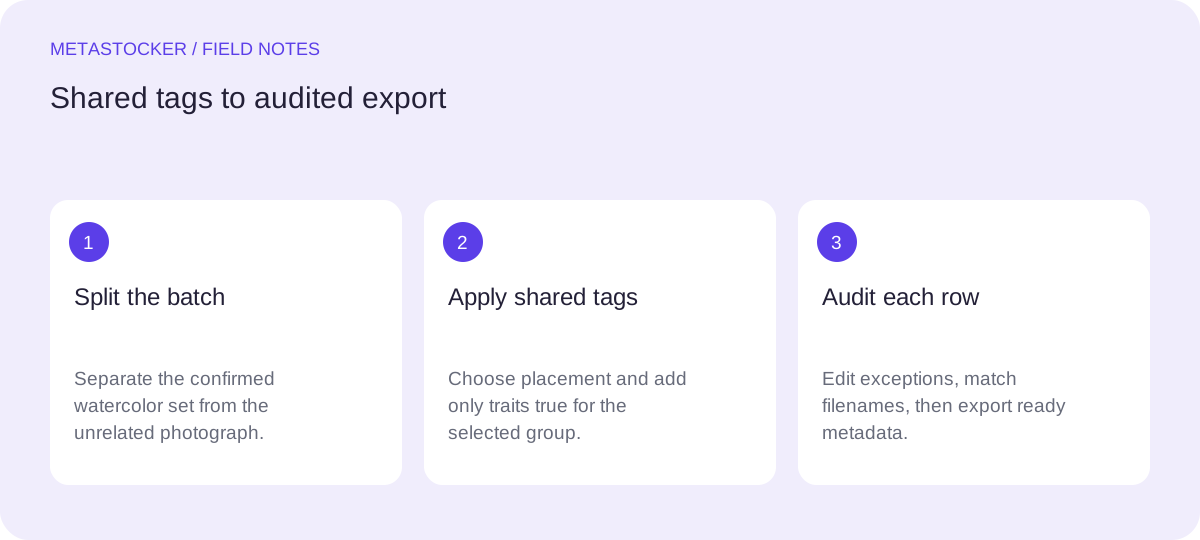
Separate the confirmed set from the exception
Before generating metadata, divide the batch by facts you can verify. A shared tag may describe the medium, subject family, or visual treatment when it is true for every selected file. It should not be added merely because the files were stored in the same folder or uploaded together.
Look for outliers before opening the generator. A photograph mixed with illustrations, a close-up mixed with a landscape, or a commercial image mixed with an editorial scene may need a different tag strategy. The batch description is context for generation, not permission to apply every phrase to every file.
- Group files by confirmed common traits.
- Remove exceptions before assigning shared tags.
- Keep uncertain claims out of the shared list.
Choose tags that survive a per-file check
A strong shared tag is both specific enough to help and literal enough to verify in every image. For a set of watercolor botanical illustrations, terms such as watercolor, botanical illustration, and hand painted may be appropriate only if the visual evidence supports them across the whole set. Do not infer an artist, location, species, ownership, or other sensitive fact from pixels alone.
Treat shared tags as a starting constraint, not a finished keyword list. Each file still needs terms for its actual plant, composition, color, background, and intended use. Marketplace guidance emphasizes relevant metadata and tailoring terms to each work; repeated or irrelevant keywords can make a row less defensible.
- Use only traits visible or documented for all files.
- Add subject and composition terms per file.
- Avoid repeating a shared tag in the individual list.
Understand first, end, and random placement
MetaStocker can place extra tags at the start, end, or random positions. First placement gives the shared terms immediate visibility, which can be useful when they are the most important descriptors. The tradeoff is that a mistaken shared term affects the prominent part of every row.
End placement preserves the beginning for file-specific priority terms. It is easier to see what the generator considered most important, but shared terms may receive less attention and can be missed during a quick review. Random placement avoids one fixed ordering pattern, yet it makes auditing less predictable and does not improve relevance by itself.
Choose placement based on review capacity, not superstition. Placement does not turn an inaccurate tag into an accurate one, and an exact tag count is not proof that the tags are correct.
- First: clearer group identity, higher prominence risk.
- End: preserves individual priorities, easier to append.
- Random: varied ordering, more demanding visual audit.
Worked example: eight illustrations and one photograph
Example: you have eight confirmed watercolor botanical illustrations showing separate flowers, leaves, and stems, plus one unrelated mountain photograph. The shared set can reasonably receive the tags watercolor and botanical illustration if those descriptions are true for all eight illustrations. The mountain photo must be excluded from that shared assignment, even if it arrived in the same folder.
For the illustration batch, choose end placement because each file needs its own subject terms first: rose, eucalyptus, fern, or dried flower, depending on the image. Then inspect every row. If the generator adds a tag such as floral arrangement to a single botanical study, remove it unless the composition actually shows an arrangement. The mountain photograph receives a separate workflow with landscape, mountain, or other terms supported by its image, not the illustration tags.
This choice favors transparent individual descriptions over a uniform visual pattern. First placement could be reasonable if the collection identity is the primary editorial point, but it would make a mistaken group tag more prominent. Random placement offers no special benefit for this small, manually reviewed batch.
Shared group tags: watercolor, botanical illustration
Illustration file: yellow-tulip.png
Review focus: tulip, yellow flower, stem, isolated background, watercolor, botanical illustration
Excluded file: alpine-lake.jpg
Do not add: watercolor, botanical illustration
Audit every file before exporting
Open the generated results and review rows one by one. Confirm that each shared tag is relevant, that the file-specific terms match the visible subject, and that no repeated or contradictory phrase slipped in. For video, inspect the full motion yourself because metadata may be based on sampled previews; the same principle applies to still images when a preview hides important details.
Delete or edit questionable tags rather than trying to preserve the requested count. If you later prepare an Adobe CSV, filenames including extensions and case must match the uploaded assets. Upload the assets first, import the CSV, and inspect the resulting metadata in the contributor portal. Current marketplace requirements can change, so check the portal and its current guidance before submission. MetaStocker exports metadata; it does not upload or submit it.
- Check shared tags on every row.
- Check file names, extensions, and capitalization.
- Inspect imported metadata in the destination portal.
- Export only rows that are ready.
Use a repeatable decision record
For recurring batches, keep a short note containing the confirmed group, excluded files, shared tags, placement choice, and the reason for that choice. This makes later corrections easier and prevents a convenient folder-level label from becoming an unchecked claim.
If the group contains too many exceptions, split it before generation. A smaller clean batch usually makes the audit clearer than a large mixed batch with many exceptions. The goal is not identical metadata; it is consistent reasoning with accurate differences between files.
- Record why each shared tag applies.
- Record exclusions before generation.
- Recheck current marketplace limits and rules.
Before you continue
- I separated confirmed files from exceptions.
- Every shared tag is true for every selected file.
- I chose placement for reviewability, not keyword count.
- I checked each file’s subject-specific terms.
- I removed irrelevant or repeated tags.
- I matched filenames before any CSV import.
- I inspected the resulting metadata in the contributor portal.
Sources and editorial approach
Prepared with AI assistance. Worked examples are illustrative. Automated checks do not replace checking the requirements of your stock platform. How these guides are made.