 MetaStocker
Portfolio SEO
Image SEO for a Photographer’s Portfolio Website
A portfolio image should help two audiences at once: visitors deciding whether your work is relevant, and search engines trying to understand the page. Image SEO is not a contest to add as many words as possible. It is a matter of making the photograph accessible, technically discoverable, and clearly connected to the surrounding page. This guide uses a hypothetical portfolio page about handmade ceramics and shows how to improve it without inventing details that the photograph cannot prove.
The goal is not a guaranteed ranking or a promise of more enquiries. Instead, you will create a page whose subject, image URL, caption, dimensions, and alternative text agree with one another. That gives people a clearer experience and gives crawlers useful context.
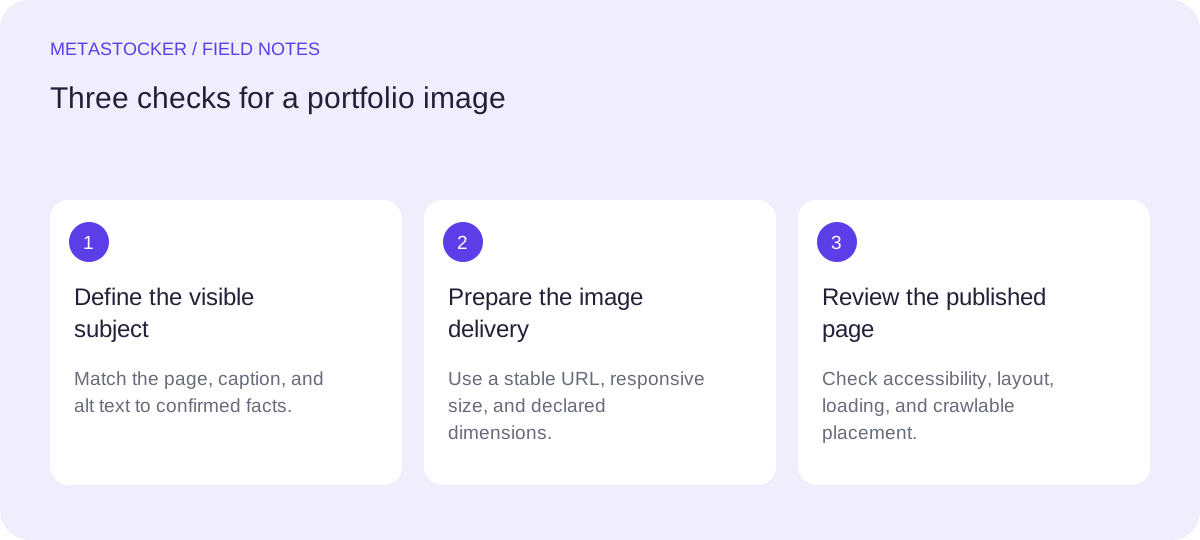
Start with the page’s actual subject
Before editing the image, write one plain sentence describing what the page is for. A photographer’s portfolio page might be a case study, a gallery entry, or a service example. Those are different intents, even when they use similar photographs.
For this assignment, the page is about a handmade ceramic mug photographed for a craft portfolio. The image can show a mug, its glaze, a table, and lighting, but it cannot establish the maker’s identity, the firing temperature, the exact clay type, or the mug’s location unless the page supplies those facts. Keep unsupported assumptions out of the metadata.
- Use the page title and visible text to state the project or object clearly.
- Describe only visible or editorially verified facts.
- Keep portfolio SEO separate from stock-marketplace keyword fields.
Write a useful caption and nearby text
A caption is visible page content, so it can explain why the photograph matters. It should sound like a sentence for a potential client or reader, not like a hidden keyword list. Surrounding copy can add information that alt text should not carry, such as the project’s process, commission context, or the photographer’s lighting approach.
A useful caption for the hypothetical page might say: “Handmade stoneware mug photographed against a warm neutral backdrop to show the speckled glaze and rounded handle.” This identifies the subject and the photographic purpose without claiming facts that are not supplied.
Place the caption close to the image and make the main heading and introductory paragraph consistent with it. If the page has multiple photographs, give each one a distinct role instead of repeating the same sentence.
- Mention the object and relevant visual feature.
- Explain the image’s role when that helps the reader.
- Avoid captions that are only strings of search terms.
Make alt text concise and specific
Alt text is a text alternative for someone who cannot see the image. It should communicate the essential subject and meaningful visual information, not reproduce every detail. For the ceramics example, “Handmade stoneware mug with speckled glaze and rounded handle” is more useful than “ceramics handmade mug pottery art craft studio neutral background brown beautiful.”
Do not begin with “image of” unless the distinction matters. Do not add tags for colors, locations, species, people, ownership, or releases when the photograph does not establish them. If an image is purely decorative and adds no information, an empty alt value may be appropriate; decide this according to the page’s accessibility implementation.
Alt text is not a substitute for a caption or a page description. Keep the wording natural, and check it while viewing the page without relying on the image itself.
- Describe the subject first.
- Include one or two meaningful visible attributes.
- Remove repeated, promotional, or speculative terms.
Give the image a crawlable, stable URL
Use an image URL that a normal visitor and a search crawler can request. A descriptive filename can help with organization, but it is not a replacement for visible context or alt text. For example, a path such as /portfolio/ceramics/speckled-stoneware-mug.jpg is easier to understand than /uploads/IMG_8472-final-final.jpg.
Avoid hiding the only important image behind an interaction that requires a search crawler or visitor to trigger an unusual script. Keep the portfolio page linked from ordinary site navigation or another crawlable page. If your site uses a sitemap, include the canonical page URLs and keep them absolute; a sitemap can help discovery but cannot guarantee crawling or indexing.
Check that redirects, access rules, and image delivery do not block the intended public page. Website indexing is separate from how a stock marketplace searches contributor metadata.
- Use a stable public path and the correct file extension.
- Link the page through normal site navigation.
- Use canonical absolute URLs in a sitemap when applicable.
Set dimensions, responsive delivery, and useful loading
Reserve the image’s layout space by declaring width and height, or by using an equivalent aspect-ratio rule. This helps the browser calculate the layout before the file arrives. Serve an appropriately sized version rather than forcing a small portfolio viewport to download an unnecessarily huge original.
Responsive image markup can offer alternate sizes for different screens. Preserve enough detail for the portfolio’s purpose, but inspect the result on a phone and a large display. Lazy loading may suit images below the opening view; the main image a visitor needs immediately should be tested carefully rather than deferred automatically.
Keep the original safely stored elsewhere if your workflow allows it, and treat the web derivative as a presentation asset. Test the actual page after changing compression, dimensions, or delivery settings so that visual quality remains part of the decision.
- Declare intrinsic dimensions or an aspect ratio.
- Offer sizes appropriate to the visitor’s viewport.
- Check both visual quality and loading behavior on real page layouts.
Worked example: one ceramics portfolio page
Suppose the page title is “Handmade Ceramics Photography: Speckled Stoneware Mug.” The photographer has one front three-quarter photograph. The visible subject is a single mug on a neutral surface; the project notes confirm that it is handmade stoneware and that the image was made for a ceramics portfolio. No maker name, location, or exact glaze ingredients are confirmed.
A sensible implementation keeps each field focused. The title explains the page, the caption explains the photographic purpose, and the alt text gives a short text alternative. The filename and URL are descriptive but do not attempt to hold every possible query. The image is delivered in a suitable derivative with dimensions declared in the page markup.
- Page heading: Handmade Ceramics Photography: Speckled Stoneware Mug.
- Caption: Handmade stoneware mug photographed against a warm neutral backdrop to show the speckled glaze and rounded handle.
- Alt text: Handmade stoneware mug with speckled glaze and rounded handle.
- Image path: /portfolio/ceramics/speckled-stoneware-mug.jpg.
- Verification action: open the published page, inspect the rendered image, and request the public URL in a normal browser session.
A practical field plan
Page purpose: ceramics portfolio case study
Image filename: speckled-stoneware-mug.jpg
Caption: Handmade stoneware mug photographed against a warm neutral backdrop to show the speckled glaze and rounded handle.
Alt text: Handmade stoneware mug with speckled glaze and rounded handle.
URL pattern: https://example.com/portfolio/ceramics/speckled-stoneware-mug.jpg
Dimensions: use the actual web derivative’s width and height, not guessed values.
Before you continue
- The page has one clear subject and useful visible text.
- The caption explains the photograph without becoming a keyword list.
- The alt text is concise, natural, and based on supported facts.
- The image URL is stable, public, and linked from a crawlable page.
- Width and height or an equivalent aspect ratio reserve layout space.
- The delivered image is tested at mobile and desktop sizes.
- The page uses canonical URLs consistently; a sitemap is treated as discovery help, not an indexing guarantee.
- If translated versions exist, each language page has its own canonical URL and appropriate reciprocal language annotations.
- The result is reviewed as a visitor would experience it, without guessing identity, ownership, location, or other hidden facts.
Sources and editorial approach
Prepared with AI assistance. Worked examples are illustrative. Automated checks do not replace checking the requirements of your stock platform. How these guides are made.