 MetaStocker
Contributor workflow
Seasonal Stock Keywords Without Mislabeling Assets
Seasonal keywords can make a useful image easier to find, but they can also make metadata inaccurate when they describe an imagined use rather than the picture itself. A generic autumn leaf flat lay may suit autumn, harvest, wellness, education, or background-design searches. That does not automatically make it a Christmas image, a Halloween image, or a holiday greeting card. This guide shows how to prepare seasonal metadata from observable details and documented contributor needs, then schedule your work without forecasting sales or promising marketplace placement.
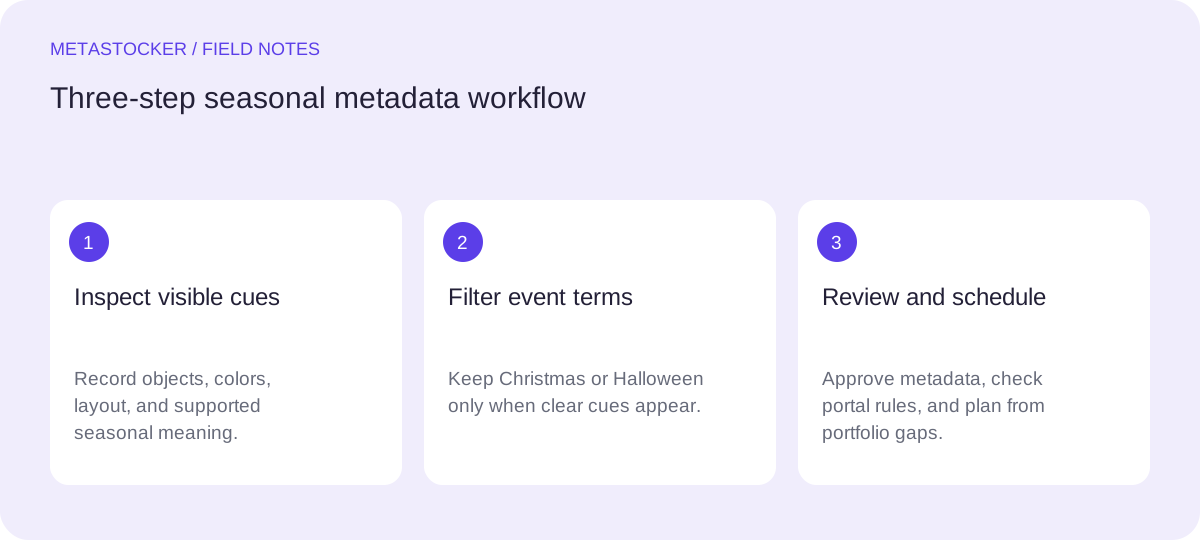
Start with what the image actually shows
Describe the visible subject before thinking about a calendar. Record the objects, colors, arrangement, surface, lighting, and usable copy space. Then identify a season only when the visual evidence supports it: fallen leaves, warm earthy colors, and a natural outdoor texture support autumn.
Avoid turning a possible use into a fact. A buyer could use an autumn image in a Halloween campaign, but that possibility does not prove that the image contains Halloween content. Do not add Christmas, Halloween, Thanksgiving, winter, or a specific celebration unless the image provides recognizable cues.
- Visible subject: dried maple leaves on a neutral tabletop.
- Composition: overhead flat lay with open space on the right.
- Supported concept: autumn background or seasonal nature composition.
- Unsupported leap: Christmas sale, Halloween party, or Thanksgiving dinner.
Separate seasonal relevance from holiday labeling
Use a two-layer decision. First, add broad terms supported by the picture, such as autumn, fall, leaves, seasonal background, warm colors, or natural texture. Second, test narrower event terms against visible evidence. If there is no pumpkin, jack-o'-lantern, costume, ornament, snow, gift, or holiday typography, leave Halloween and Christmas out.
This restraint is practical because irrelevant or repeated terms can weaken the usefulness of a metadata set and may conflict with marketplace guidance. Seasonal timing belongs in your planning calendar; it does not belong in the keyword field unless the image itself supports it.
- Use “autumn” and “fall” when both are accurate audience terms.
- Use “holiday background” only when the visual genuinely signals a holiday.
- Do not infer a celebration, location, person, species, or ownership from pixels alone.
Build a compact, platform-aware keyword set
Write a descriptive title or phrase first, then choose the most important terms early. For an Adobe Stock submission, the current reference guidance permits up to 49 keywords, while the CSV guide has its own requirements; using fewer, highly relevant terms is often easier to review. Keep the metadata language aligned with the contributor account where required.
Do not copy one list blindly across marketplaces. Requirements vary, and current contributor portals should be checked before upload. If a platform requests English metadata, a Russian-language article or personal workflow does not change that requirement.
- Title: Autumn leaf flat lay with copy space.
- Keywords: autumn, fall, leaves, leaf, flat lay, seasonal background, nature, warm colors, minimal, texture, copy space, overhead view.
- Remove terms that describe a possible campaign rather than the image.
Worked example: prepare and schedule one asset
Example, not a measured result: suppose the file is named autumn-leaves-01.jpg. It shows three dried leaves on beige paper, photographed from above, with empty space on the right. The first metadata draft says “Autumn leaf flat lay with copy space.” The keyword review keeps autumn, fall, dried leaves, flat lay, beige background, copy space, overhead, minimal, nature, and seasonal design.
The review rejects Christmas, Halloween, harvest festival, Thanksgiving, winter, and greeting card because none is visibly established. “Harvest” might be conceptually related, but it is still too specific for this frame unless the image includes harvest objects or the contributor can accurately defend that interpretation.
Now schedule preparation from observed needs. If your portfolio review shows that you repeatedly lack clean seasonal backgrounds, prepare this file and similar assets before the relevant planning window. That is a production decision based on a documented gap, not a forecast of downloads or revenue. Recheck the portal rules when you are ready to submit.
Filename: autumn-leaves-01.jpg
Title: Autumn leaf flat lay with copy space
Keywords: autumn, fall, leaves, dried leaves, flat lay, seasonal background, beige background, copy space, overhead, minimal, nature, texture, warm colors, seasonal design
Use a local generator as a drafting aid
MetaStocker can generate editable metadata locally in the browser using its supported local models, with the default model loaded explicitly by the user. Treat the output as a draft: provide batch context that states only shared facts, inspect each file, and remove unsupported holiday terms. Extra tags still need file-by-file review; a requested count is not evidence that every tag is accurate.
Local execution keeps photos, prompts, and results on the device during local mode, but the first model download needs internet. Model memory and browser cache are different things. Exporters create files for supported formats; they do not upload or submit them, guarantee acceptance, or embed metadata into the original image.
Final review before exporting
Read the title as a natural description, not a pile of search terms. Check the first important terms, remove duplicates and speculative events, and confirm that the filename exactly matches the asset when using a CSV workflow. After importing, inspect the resulting metadata in the contributor portal. Marketplace policies can change, so verify current limits and language rules at the point of submission.
For website SEO, keep the distinction clear: marketplace keywords affect internal stock search, while Google indexing concerns pages on a website and their surrounding text. Neither workflow guarantees ranking, traffic, downloads, or revenue.
- Review every seasonal and event term against visible evidence.
- Confirm language, title limits, keyword limits, and category rules for the target platform.
- Keep the original image unchanged unless your own separate workflow says otherwise.
- Export only rows that you have manually approved.
Before you continue
- I described the visible subject before selecting seasonal terms.
- I used autumn or fall only because the image contains autumn cues.
- I excluded Christmas and Halloween without supporting visual evidence.
- I kept metadata relevant, readable, and platform-specific.
- I scheduled preparation from an observed portfolio need, not a sales prediction.
- I reviewed generated output and checked current portal requirements before submission.
Sources and editorial approach
Prepared with AI assistance. Worked examples are illustrative. Automated checks do not replace checking the requirements of your stock platform. How these guides are made.