 MetaStocker
Contributor workflow
Record Shoot Facts Before AI Stock Keywording
AI can describe what appears in a photograph, but it cannot know every fact behind the frame. Before generating stock metadata, record the information that came from the shoot: where the image was made, what materials were used, what permission was obtained, and which details remain unknown. This short fact record gives the generator useful context without turning guesses into claims.
The workflow below uses a hypothetical example: a contributor photographs a handmade blue ceramic mug on a wooden table. The shoot notes say that the image was made in a rented studio in Bristol, United Kingdom, on 2026-09-12; the mug is stoneware clay with a food-safe glaze; the table belongs to the studio; and the studio manager gave written permission for commercial stock use. The notes do not identify the maker, the glaze brand, the wood species, or the final beverage inside the mug. Those unknowns must stay unknown.
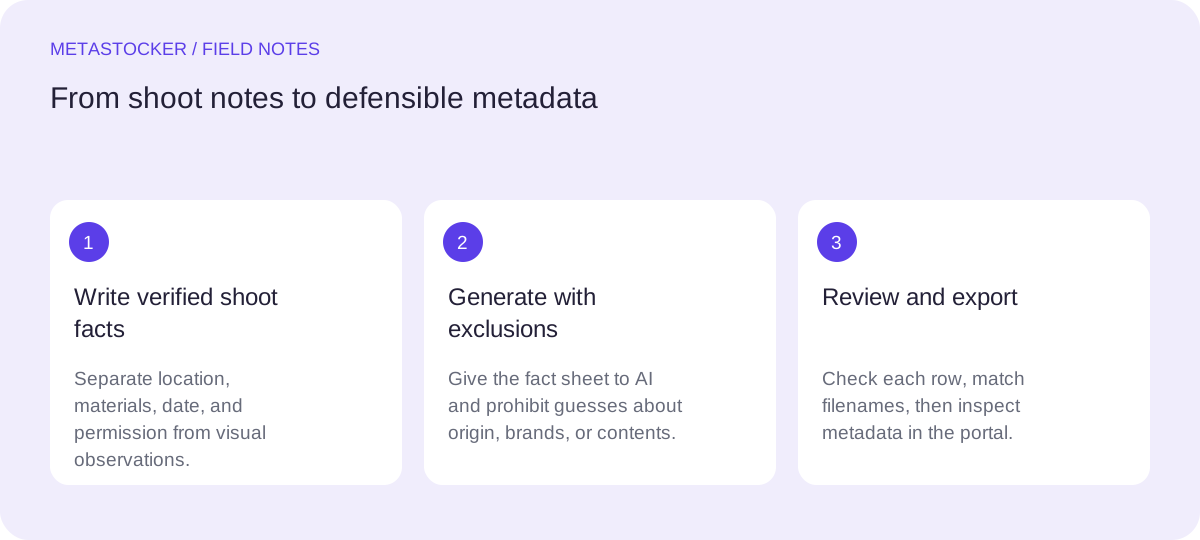
1. Create a fact sheet before prompting
Start with a small record for each image or coherent set. Separate facts supplied by the photographer from observations visible in the frame. This distinction is more important than making the prompt sound detailed: a polished guess can still create misleading metadata.
For the mug example, put the verified information in one block: studio location, shoot date, stoneware clay, food-safe glaze, studio-owned table, and written commercial-use permission. Put visual observations in another block: blue cylindrical mug, handle, wooden surface, soft side light, and empty-looking interior. Use a third block for unknowns: maker, brand, wood species, and contents.
- Verified facts can enter the context as facts.
- Visible observations should be phrased descriptively, not as proof of origin.
- Unknown details should be marked unknown or excluded.
Verified: Bristol studio; 2026-09-12; stoneware clay; food-safe glaze; studio table; written commercial permission.
Visible: blue ceramic mug, handle, wooden surface, side light.
Unknown: maker, glaze brand, wood species, beverage.
2. Keep location, materials, and permission distinct
These three fields answer different editorial questions. Location describes where the work was created, not necessarily where the object originated. Materials describe what the photographer or maker confirmed, not what a model thinks it recognizes. Permission records the right to use the scene or object; it does not prove ownership of every visible item.
In the example, “made in a Bristol studio” is supported by the notes. “Bristol pottery” would be an unsupported inference about origin. “Stoneware clay” is usable because it was recorded, while “oak table” is not. Written permission supports the contributor’s submission record, but it does not justify naming a person, maker, or brand that was never identified.
Keep permission documentation with the project records even if it is not turned into a keyword. Platform policies and contributor requirements can change, so check the current portal before submission.
- Use location as a documented shoot fact.
- Use material names only when confirmed.
- Treat permission as documentation, not a descriptive keyword.
3. Write a controlled AI context
A useful context note is specific enough to prevent invention and narrow enough to avoid blanket tags. State what the model may use, what it must not infer, and what kind of output you need. For a mixed batch, do not apply one location or material statement to every file unless every file shares it.
A practical prompt for the mug could say: “Use the verified facts and visible observations below. Do not infer the maker, brand, wood species, beverage, person, or geographic origin of the mug. Suggest accurate English stock metadata. Keep the title descriptive and put the strongest concepts first. Exclude unsupported claims.” This is a request for editorial assistance, not a substitute for checking the result.
- Ask for descriptions, not invented provenance.
- Tell the model which fields are prohibited.
- Use English metadata when the target marketplace requires English, even if your working notes are in another language.
4. Review every proposed term against the notes
Read the generated title and keywords one by one. Ask whether each term is a verified fact, a cautious visual description, or an unsupported conclusion. Remove terms that introduce a person, trademark, origin, species, ownership claim, or ingredient without evidence.
For the hypothetical mug, “blue ceramic mug,” “stoneware,” “handmade-style,” and “wooden table” need different treatment. “Blue ceramic mug” describes the visible object. “Stoneware” is supported by the shoot notes. “Handmade-style” describes an appearance but should not replace the factual material record. “Wooden table” is safer than “oak table.” If the result says “coffee mug,” retain it only if the photographer confirmed coffee; an empty-looking interior is not evidence of a beverage.
Stock metadata should remain relevant and concise. Adobe’s current guidance allows up to 49 keywords and emphasizes the first ten, so prioritize the most important accurate concepts rather than filling every available slot.
- Delete unsupported specificity instead of softening it with confident wording.
- Check the first ten keywords for the central subject and verified context.
- Do not treat the requested number of tags as proof that the tags are accurate.
Possible title: Blue stoneware mug on wooden table in studio
Priority keywords: blue mug, stoneware, ceramic, wooden table, studio, still life, drinkware, handmade style, Bristol, United Kingdom
5. Use local generation with a human checkpoint
MetaStocker’s local mode runs supported vision and thinking models in the visitor’s browser through WebGPU workers. The first model download needs internet, and browser model cache is not the same as a model actively loaded in memory. Local mode does not require an account or API key, while an optional personal OpenAI API mode sends previews and context to OpenAI; keep any API key private.
Load one local model first, then review the output. The app can accept image files, videos, and .ai files with a readable preview, but video metadata is based on sampled previews, so inspect the full motion yourself. Extra tags and batch context can be helpful, yet each file still needs an individual relevance check. Unload or delete model files only with a clear understanding of what remains cached; do not assume permanent offline availability.
- Give the model the fact sheet, not an invented backstory.
- Inspect editable results before export.
- Keep the original evidence and the generated metadata together.
6. Export only rows you can defend
When a row is ready, confirm the filename, title, keywords, category, and any release reference against your records. MetaStocker exports formats for Adobe, Envato, Shutterstock, and Freepik, but the exporter does not upload, submit, embed metadata into originals, or guarantee acceptance.
For Adobe CSV work, upload the assets first, then import the CSV. Filenames, including extension and case, must match, and the resulting metadata should be inspected in the contributor portal. Requirements can change, so validate the current upload screen. A clean CSV is an administrative aid, not evidence that a claim is true or that a marketplace will accept the file.
- Export only reviewed rows.
- Check exact filenames and current platform requirements.
- Keep factual notes available if a reviewer or future edit raises a question.
Before you continue
- Record the shoot location and date from notes, not pixels.
- List confirmed materials separately from visible appearances.
- Document permission without turning it into an ownership claim.
- Mark people, brands, origins, species, and contents unknown unless verified.
- Give AI narrow context and explicit exclusions.
- Review every title and keyword before export.
- Inspect imported metadata in the current contributor portal.
Sources and editorial approach
Prepared with AI assistance. Worked examples are illustrative. Automated checks do not replace checking the requirements of your stock platform. How these guides are made.