 MetaStocker
Contributor workflow
How to Audit an Older Stock Portfolio Without Rewriting It All
An older stock portfolio rarely needs a total metadata rewrite to become easier to manage. A focused audit can reveal obvious mistakes, preserve useful work, and create a small record for future comparison. The goal is not to promise better rankings or sales. It is to make a defensible editorial change and learn what happens afterward without pretending that one change proves a cause.
Define a small audit before opening files
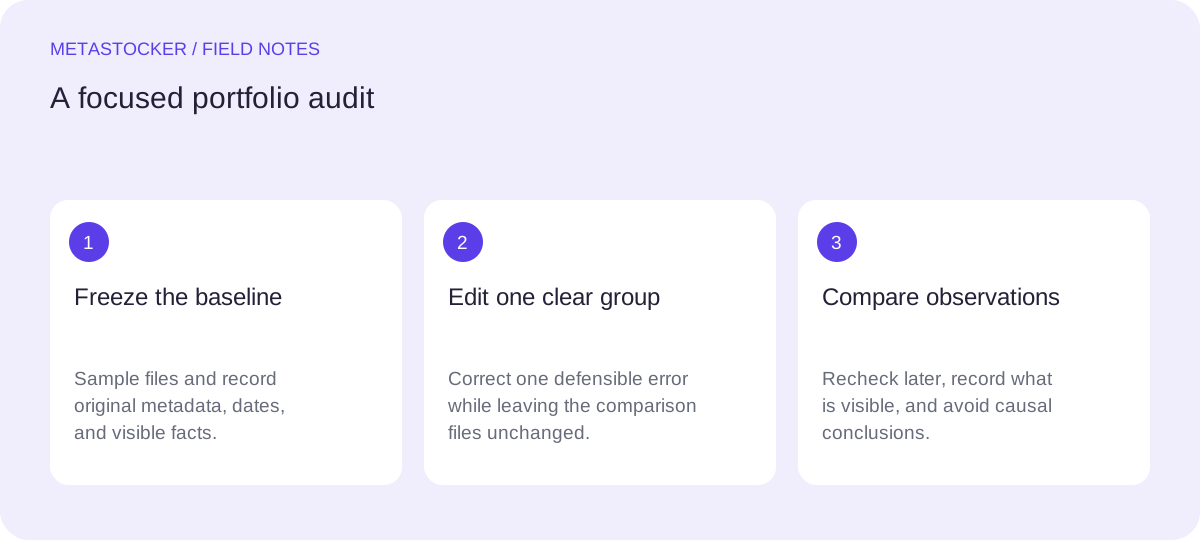
Choose a narrow sample that you can inspect carefully: for example, 12 files from one subject, upload period, or recurring production habit. Do not select only the files you expect to perform well. A simple random choice within one category, or every fourth file in an export, is easier to explain later.
Create an audit sheet with one row per asset. Record the filename, original title, original keywords, upload or publication date if available, marketplace, content type, and any observations. Add columns for clear error, proposed action, change date, and future observation. Keep the original metadata unchanged in a separate field so your revision can be reversed or compared.
- Sample one coherent group rather than the entire portfolio.
- Record dates as dates, not vague labels such as “old” or “recent”.
- Separate observed facts from your interpretation.
Audit columns:
filename | original title | original tags | upload date | clear error | proposed action | change date | later observation
Look for errors that are easy to defend
Start with problems that do not depend on guessing what buyers want. A title that says “IMG_4821” is an obvious descriptive failure. A keyword for a person’s identity, an unverified location, or a species guessed from pixels is unsafe. Repeated, irrelevant, or contradictory terms are also useful findings.
For each proposed edit, write the evidence in plain language: “The image shows a bicycle parked beside a brick wall; it does not show a city landmark.” Avoid replacing one vague assumption with another. Marketplace requirements differ, so check the current contributor portal and item-specific policy before applying limits or changing editorial details.
- Remove terms that are visibly unrelated.
- Do not infer identity, ownership, release status, exact location, or species from appearance.
- Treat documentary dates and locations as facts to verify, not guesses.
Use ordering and limits as checks, not magic formulas
Relevant terms should describe the actual file. For Adobe Stock, the most important terms belong near the beginning, with particular attention to the first ten, and the general keyword guidance permits up to 49 keywords. A conservative working limit can help you review a crowded list, but it is not proof that a file will be accepted or discovered.
If you work in English metadata, keep the language consistent with the contributor account and marketplace requirement. A Russian-language audit article does not mean Russian keywords are appropriate. For another marketplace, inspect its current rules: keyword counts, categories, descriptions, and editorial fields may differ.
- Rank the strongest visible concepts first.
- Prefer specific, relevant terms over repetitions and broad filler.
- Recheck current portal rules before exporting or uploading.
Worked example: change one justified group
Example, not a measured result: suppose your sample contains 12 older photographs of bicycles near urban architecture. You record the original metadata and dates before editing. Four files have accurate titles but place “London” among the tags even though the location is unknown. Three use “cycling race” although no race is visible. The remaining five have mostly relevant descriptions.
You decide to change only the group with the clear “cycling race” error. For those three files, you remove that term and replace it only when the image visibly supports a narrower description, such as “parked bicycle,” “urban transport,” or “brick wall.” You do not rewrite all titles, add a speculative city, or alter the other nine files. Record the exact old and new lists, the reason, and the date.
This narrow choice has a tradeoff: it leaves some possible improvements untouched, but it gives you a cleaner observation period. The files with the location problem can become a later group, after you have documented the first change.
- Group files by the same clear problem, not by hoped-for performance.
- Change one meaningful variable where practical.
- Keep an untouched comparison group in the sample.
Example record:
Group A: 3 files, visible bicycles, incorrect “cycling race” tag.
Action: remove the unsupported tag; add only visible concepts.
Group B: 9 files, no edit during this observation period.
Change date: 2026-09-18.
Apply edits carefully and review the result
You can edit directly in each contributor portal, or prepare a platform-specific file where supported. MetaStocker is a free local metadata generator: its local models run in the browser, and its exporters can produce Adobe, Envato, Shutterstock, and Freepik CSV formats. It does not upload or submit the files, embed metadata in originals, or guarantee acceptance.
If you use the app, load a model deliberately: loading model memory is different from keeping downloaded browser files in cache. Local generation uses the visitor’s device; the server hosting the article is unrelated to that inference. Review every generated row, especially extra tags and batch descriptions, because a requested tag count does not establish accuracy. For CSV workflows, verify exact filenames, including extensions and case, then inspect imported metadata in the contributor portal.
- Export only rows you have reviewed and approved.
- Do not use a batch description as a blanket claim for mixed files.
- Keep a copy of the before-and-after audit record.
Observe later without claiming causation
Set a practical observation schedule, such as checking the same sample after four and eight weeks. Record only comparable observations: whether files remain available, visible marketplace indicators you can actually access, and any metadata corrections requested by the platform. Do not describe a change as causing a result when other factors—seasonality, competition, search changes, licensing demand, or portfolio history—also moved.
At the end, write a restrained conclusion: “The edited group remained available and had these observations,” or “The portal requested a correction.” If you continue, choose the next justified group and document why. This turns an old portfolio into an auditable sequence of decisions rather than a retrospective rewrite.
- Use the same fields and dates at every check.
- Record null or unavailable observations instead of filling gaps with guesses.
- Treat the result as an observation, not a ranking or sales experiment.
Before you continue
- Select a small, coherent sample.
- Record original titles, tags, dates, filenames, and marketplace.
- Mark only errors you can support from the file or verified records.
- Choose one justified problem group and leave a comparison group unchanged.
- Review platform rules and exact CSV filenames before any import.
- Inspect every edited result before export.
- Schedule later observations and avoid causal claims.
Sources and editorial approach
Prepared with AI assistance. Worked examples are illustrative. Automated checks do not replace checking the requirements of your stock platform. How these guides are made.