 MetaStocker
Contributor workflow
Stock Metadata Quality Checklist Before Upload
A metadata check should answer two different questions in order: “Does this text describe what is actually visible?” and “Will this text fit the destination platform?” Mixing these questions makes errors easy to miss. A polished title can still contain an invented location, while accurate keywords can still fail because the filename does not match or the account language is wrong.
Use this guide as a repeatable final pass before upload. It works for manually written metadata and for rows prepared with MetaStocker. The app can generate editable results and export platform-specific CSV files, but it does not upload or submit them, guarantee acceptance, or embed metadata into original files. The contributor remains responsible for checking every row.
1. Freeze the file list first
Start with the exact assets you intend to submit. Give each file a temporary review status: ready for review, needs correction, or remove from batch. Do not review a generic keyword list separately from its image; metadata must stay attached to the correct file.
Check the filename, extension, and spelling before editing text. For CSV workflows, the filename must match the uploaded asset, including extension and case. A renamed file after export can break that connection. Keep a simple working folder with the final asset names and the matching metadata file.
- Open the actual preview, not only a thumbnail.
- Confirm that every metadata row has one intended asset.
- Avoid mixing unrelated images under one batch description.
2. Pass one: check image-to-text facts
Read the title and keywords while looking at the image or full video. Mark every term as visible, strongly supported by context, or speculative. Keep visible subjects, actions, setting, composition, color, and usable concepts. Remove claims that require guessing.
Do not infer a person’s identity, occupation, ethnicity, age, ownership, precise location, release status, species, or event from pixels alone. For editorial captions, dates and locations need verification. Video deserves extra care: a sampled preview may miss an object, action, or visual defect, so inspect the full motion yourself.
A useful test is deletion: if removing a word makes the description less precise, keep it; if the image remains equally understandable, question whether the word is necessary. Repeated synonyms and broad tags that do not fit the individual file add noise.
- Circle uncertain facts and replace them with observable wording.
- Check singular and plural forms against what is shown.
- Review extra tags individually, even when they were added to a batch.
Example: A photo shows a ceramic mug with a blue geometric pattern on a wooden desk beside a closed notebook. Keep “ceramic mug,” “blue,” “geometric pattern,” “wooden desk,” “notebook,” and “workspace.” Avoid “coffee,” “office employee,” “handmade,” or “morning routine” unless the image provides evidence.
3. Pass two: check platform format
Now stop judging the picture and inspect the destination rules. Platform limits and requirements differ, so one metadata set should not be assumed to fit every marketplace. Check the current contributor portal before exporting or importing because policies and upload screens can change.
For an Adobe Stock workflow, use the account’s required metadata language, put the most important terms first, and stay within a conservative maximum of 49 keywords. The current CSV guidance gives a 70-character title limit; validate the upload screen as well. Other platforms may require English metadata, different keyword ranges, categories, tags, or descriptions. Shutterstock, for example, currently describes English metadata and 7–50 relevant keywords, while Envato requirements vary by content type.
Inspect rejected or suspicious words rather than replacing them automatically. A platform warning is a prompt to verify relevance, not proof that the image is unsuitable. Remove irrelevant brand names, duplicated tags, unsupported claims, and keyword-list titles. For a website, descriptive surrounding text and alt text serve Google image discovery; they are separate from internal marketplace search metadata.
- Confirm language for the contributor account and target platform.
- Count keywords after removing duplicates and punctuation problems.
- Check title length, category fields, and any platform-specific columns.
- Use the current portal instructions for the final decision.
4. Worked example: repair one row
Example: You are preparing an English Adobe Stock row for the mug image above. The first draft says: “Morning coffee in a cozy office” and uses these keywords: coffee, morning, office, mug, cup, blue, geometric, desk, notebook, business, employee, productivity.
The image does not prove coffee, morning, an office, a business setting, an employee, or productivity. Rewrite the title as “Blue geometric ceramic mug beside notebook on wooden desk.” The revised keywords focus on supported details: ceramic mug, blue, geometric pattern, cup, wooden desk, notebook, workspace, still life, drinkware, tabletop, copy space. Put the most important concepts first and remove the rest.
This tradeoff is intentional: the revised row is narrower but more defensible. A broad imagined story may feel attractive, yet it can mislead buyers and create platform review problems. If the target marketplace requires English, keep these metadata fields in English even when your editorial notes or article are in Russian.
5. Check filenames, CSV, and readback
Before export, compare every row with the actual asset name character by character. In a CSV workflow, include the extension and preserve case exactly where required. Open the exported file as plain text or in a spreadsheet and inspect delimiters, quotation marks, line breaks, empty fields, and commas inside descriptions.
Importing a CSV is not the end of the review. Upload the assets first when the platform requires that order, then inspect the resulting metadata in the contributor portal. Compare the portal’s readback with your approved title, keywords, category, and release-related fields. Correct anything altered, truncated, rejected, or mapped to the wrong file.
Do not assume that a successful import means acceptance. Keep the approved working copy until the portal displays the expected values and the submission is ready for the platform’s own review.
- Verify asset-to-row matching after export and after import.
- Read the portal fields, not only the local CSV.
- Check the current portal guidance for changed limits or fields.
6. Use a final stop rule
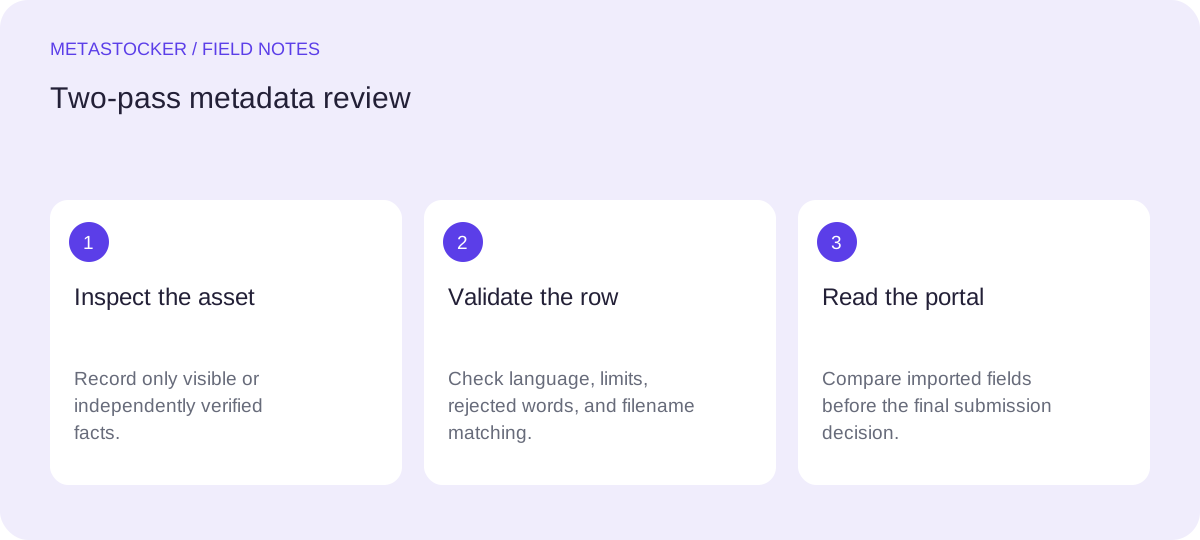
Export only rows that pass both reviews. If a fact is uncertain, pause and rewrite it in observable language or remove it. If a format rule is unclear, consult the current platform instructions before sending the file. A smaller, accurate metadata set is easier to audit than a crowded row built from guesses.
If MetaStocker helped prepare the draft, review its editable results per file. Local processing runs in the visitor’s browser, but model loading and browser cache are different things, and local generation does not remove the need for human inspection. The exporter prepares files; it does not submit them or preserve unsaved work after a tab closes.
- Pass one: every term is supported by the asset.
- Pass two: every field fits the current destination.
- Readback: the portal shows the intended values.
Before you continue
- I reviewed the final asset, including full video motion where applicable.
- Every title and keyword describes observable or verified information.
- I removed guessed identities, locations, releases, species, brands, and events.
- The metadata language matches the target account or platform.
- The title, keyword count, category, and fields meet current portal rules.
- Filenames match exactly, including extensions and case where required.
- I inspected the CSV structure and exported only ready rows.
- I checked the portal readback after import.
- I understand that import or export does not guarantee acceptance.
Sources and editorial approach
Prepared with AI assistance. Worked examples are illustrative. Automated checks do not replace checking the requirements of your stock platform. How these guides are made.