 MetaStocker
Titles & keywords
How to Describe People in Stock Photos Without Guessing
People can make a stock image immediately useful, but they also create a metadata risk: a photograph may show an activity clearly while revealing almost nothing reliable about who is pictured. The safest workflow is to describe visible action, setting, objects, composition, and intended use, while treating identity and demographic details as unknown unless you have dependable information from the model or production records.
This guide uses one practical question throughout: what can a buyer understand from the image, and what would require a guess? That distinction matters on marketplaces with English metadata requirements, and it also matters when preparing batches with a local generator such as MetaStocker. A generated row can contain the requested number of tags and still be inaccurate, so every person-related term needs a human review.
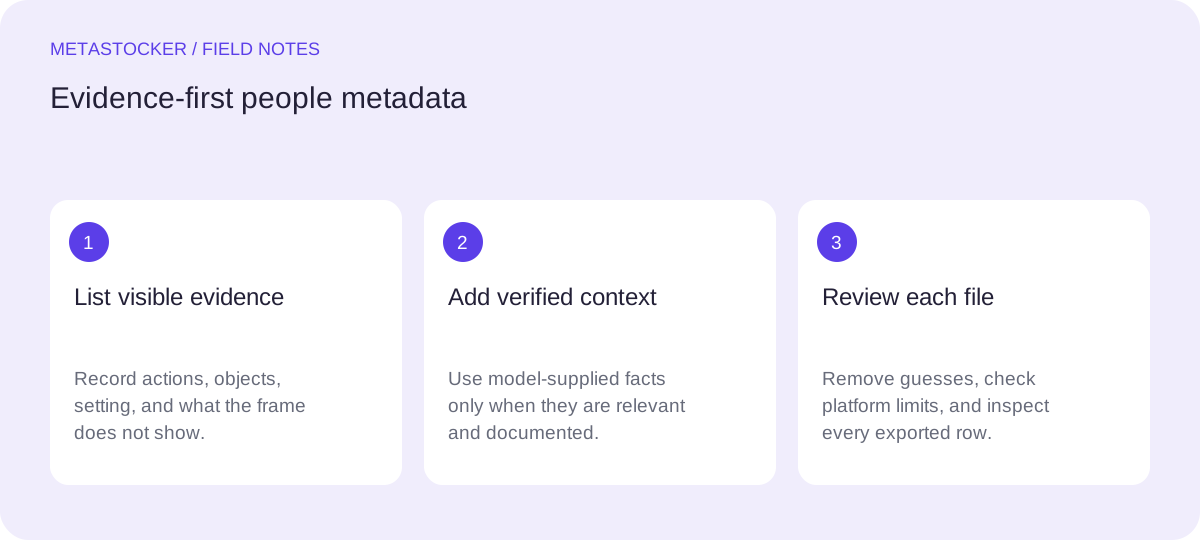
Separate observation from assumption
Begin with an evidence pass. Write down what the camera actually shows: hands chopping vegetables, a person wearing an apron, two people carrying boxes, or a group standing in the background. Then create a second, separate list of things you know from reliable production information, such as a model’s self-description as an adult or a supplied release record.
Do not turn visual impressions into identity claims. Skin tone, hairstyle, clothing, facial features, body shape, apparent age, accent, or location in the frame cannot by themselves establish ethnicity, nationality, gender identity, religion, health, profession, or exact age. The same caution applies to an indistinct group: if faces and context are unclear, “group of people” is safer than a detailed demographic label.
- Use visible verbs: preparing, cutting, pouring, carrying, discussing.
- Use documented facts only when they are genuinely available.
- Treat uncertainty as a reason to omit a term, not a reason to soften it with “probably.”
Observation: adult hands kneading dough on a kitchen counter.
Reliable supplied fact: the person is a self-described adult model.
Avoid: “young woman,” “Italian chef,” or “mother cooking.”
Build the title around the main action
A title should help a buyer recognize the image quickly. Put the central subject and action first, then add the setting or purpose if it is visible and useful. A natural phrase is more helpful than a string of disconnected keywords, and the title should not claim more than the frame supports.
For a close-up with no face, identify the body part only when composition makes that useful. “Hands preparing a vegetable meal in a home kitchen” is concrete. It does not need a guessed identity, family role, cuisine, or nationality. If a platform imposes a title limit, keep the wording concise and check the current contributor requirements before upload.
- Lead with the action buyers would search for.
- Mention visible objects and context, not an invented backstory.
- Keep title wording natural rather than repeating tags.
Example title: Hands preparing a healthy meal in a home kitchen
Choose keywords by evidence and buyer intent
After the title, add terms that describe the actual image and its likely commercial concepts. Useful keywords might include cooking, meal preparation, chopping, vegetables, kitchen, food preparation, hands, domestic life, nutrition, and lifestyle, provided each matches the frame. “Healthy” should be used only when the food or supplied context supports that concept; it should not become a blanket claim about the person.
Order the strongest terms first where the marketplace gives early keywords extra weight. Stay within the platform’s current limits. Adobe’s general guide permits up to 49 keywords, while Shutterstock’s guidance describes 7 to 50 relevant keywords and requires at least one category. Those limits do not make a long list automatically good. Remove repetitions, vague demographic guesses, and terms that describe a different image.
- Ask of every tag: can I point to evidence for this word?
- Prefer specific actions and objects over generic people labels.
- Do not add a demographic term merely because it might attract a search.
Possible keywords: meal preparation, cooking, chopping, vegetables, kitchen, food, hands, home, lifestyle, nutrition, domestic life, recipe, healthy eating
Handle reliable model information carefully
Some information can be used because it comes from a dependable source rather than from pixels. In this assignment’s scenario, a model is self-described as an adult. That can support “adult” when the platform and licensing context make the term relevant. It still does not establish a precise age, gender, ethnicity, nationality, occupation, or relationship to anyone else in the image.
For a release-based workflow, keep the record of what was supplied separate from your visual description. Do not use a release to invent a location, profession, or family connection that it does not document. If you cannot verify a claim, leave it out. A shorter accurate keyword set is more defensible than a fuller set built on assumptions.
- Record the source of nonvisual facts in your production notes.
- Use “adult” only when it is supported and materially relevant.
- Never infer identity or sensitive attributes from appearance alone.
Supported: “adult model preparing food,” when the model supplied that description.
Unsupported: “professional chef,” unless that role is separately documented.
Worked example: close-up, portrait, and distant group
Imagine three related files from one cooking shoot. File A is a close-up of hands slicing peppers; the face is outside the frame. File B shows a self-described adult model pouring soup, with a visible face but no supplied nationality or occupation. File C shows a distant group near a table, with faces too small to identify and no verified event details.
Create separate metadata for each file instead of applying one batch description to all three. File A can focus on hands and food preparation. File B can mention an adult person preparing or serving food, but not “chef,” “mother,” or a guessed ethnicity. File C should stay broad: people, group, gathering, table, and social activity if those elements are visible. Do not reuse “portrait” for the distant group or “hands” for a frame where hands are not a meaningful feature.
If you use MetaStocker’s local generator, put only shared, factual context in the batch description. Generate or draft rows, then inspect each result individually. Extra tags and an exact tag count are not evidence that every term is appropriate.
- Create one evidence list per file before accepting generated metadata.
- Delete tags that belong to a neighboring image in the batch.
- Review the complete frame, especially for video sampled from previews.
File B title: Adult person serving soup at a kitchen table
File B keywords: adult, serving, soup, meal, kitchen, food, cooking, table, home, lifestyle
Excluded: nationality, ethnicity, exact age, chef, parent, customer
Review before export and platform upload
Read the title as a factual sentence. Then scan every keyword and ask whether it is visible, reliably documented, or a clearly supported concept. Check that the metadata language matches the contributor account where required; for platforms requiring English, Russian editorial notes do not replace English marketplace metadata.
If you export a CSV, treat it as a preparation file, not a submission. For Adobe, assets must be uploaded before importing the CSV, and filenames including extension and case must match. Inspect the resulting fields in the contributor portal. Requirements can change, so check the current portal and item-specific policy before using a saved template. MetaStocker exports files for supported platforms but does not upload them, embed metadata in originals, or guarantee acceptance.
- Check filenames, title limits, keyword limits, and categories.
- Inspect imported rows in the current contributor portal.
- Keep the original files unchanged and retain an editable metadata copy.
Before you continue
- Describe actions, objects, setting, and composition before people’s identity.
- Use demographic or identity terms only when supported by reliable model information or records.
- Do not infer age, ethnicity, nationality, gender, profession, family role, health, or location from pixels.
- Write separate metadata for visually different files in the same batch.
- Keep marketplace metadata in the platform’s required language.
- Review every generated row and verify current portal requirements before upload.
Sources and editorial approach
Prepared with AI assistance. Worked examples are illustrative. Automated checks do not replace checking the requirements of your stock platform. How these guides are made.