 MetaStocker
Titles & keywords
How to Keyword a Cat Photo Without Guessing Its Breed
A pet photo can look simple to describe, yet one unsupported detail can make its metadata misleading. In this worked example, the image shows a cat resting beside a window. The photographer’s shoot note says that the breed requires confirmation. That note is important: it tells us not to name a breed in the title or keywords unless the photographer later confirms it. We can still describe the visible subject, pose, setting, light, and mood precisely. The goal is metadata that helps a buyer find the image without turning a visual guess into a fact.
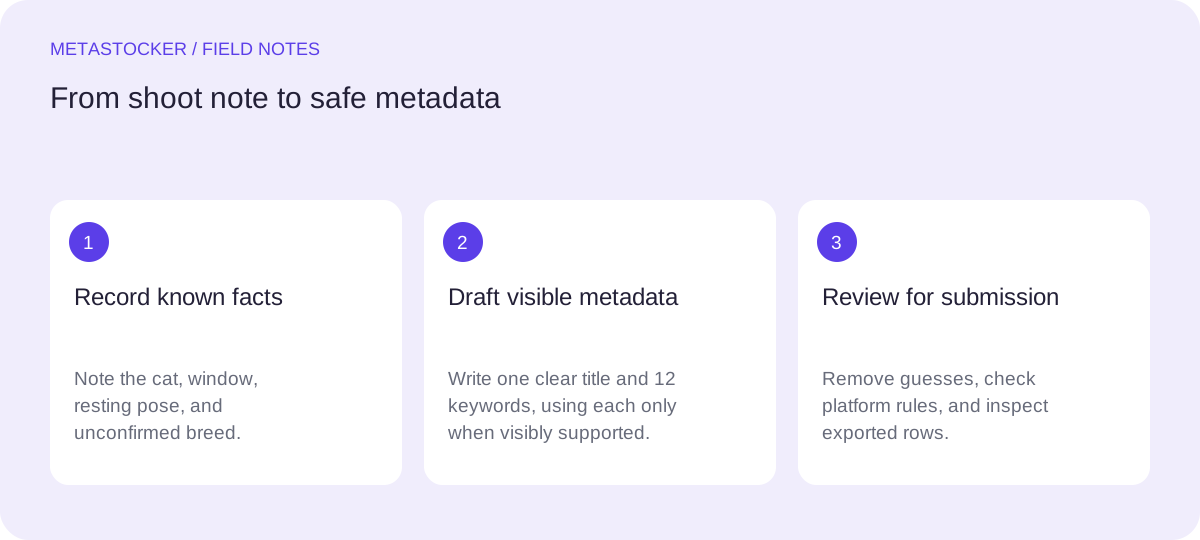
Separate the shoot note from visible evidence
Start by writing down what is known before drafting metadata. The supplied shoot note identifies the subject as a cat resting beside a window and warns that the breed requires confirmation. Use those facts as editorial boundaries, not as an invitation to fill gaps.
The image can support terms such as cat, resting, indoor, window, home interior, daylight, and domestic animal if those details are genuinely visible. It cannot establish a breed, the cat’s ownership, the photographer’s home, the exact location, or the animal’s personality. Avoid words such as purebred, owned, rescued, lonely, or calm unless they are independently documented and relevant.
- Known: cat, resting beside a window, breed unconfirmed.
- Potentially visible: indoor setting, window light, fur, pose, and composition.
- Do not infer: breed, owner, address, location, or emotional state.
Write a specific title before keywords
A title should read like a useful description rather than a pile of search terms. Put the central subject and action first, then add the setting or visual context. For Adobe Stock, keep the title brief and accurate, ideally under 70 characters, and remember that its CSV guidance currently gives a 70-character limit. Shutterstock likewise advises a descriptive phrase rather than a keyword list.
If the image visibly shows soft daylight, a suitable English title is “Cat resting beside a window in soft daylight.” It then describes the same cat, position, object, and light without pretending to know the breed. If the light or indoor setting is not actually visible, remove those terms instead of preserving a more attractive sentence.
- Lead with the subject and action.
- Add only visible context that distinguishes this file.
- Do not use a guessed breed to make the title more specific.
Conditional title (use only if soft daylight is visible): Cat resting beside a window in soft daylight.
Build a compact, relevant keyword set
Keywords should cover direct visual descriptions and a few accurate concepts, without repetition. Use the strongest terms first because Adobe gives particular attention to the first ten positions and permits up to 49 keywords. Shutterstock’s current guidance calls for 7 to 50 relevant keywords. These are limits, not targets: a smaller accurate set is preferable to padding.
For the worked example, begin with the object and scene, then add composition and broad concepts. Do not add dog, kitten, Persian, Siamese, pet owner, bedroom, or exact location unless the file and documentation support them. “Kitten” is not a safe synonym for cat because age is another fact that may not be visible.
- Prioritize exact, file-specific terms over broad traffic guesses.
- Use each useful term once and remove near-duplicates.
- Keep marketplace language requirements in mind; a platform may require English metadata.
Conditional keyword example (use each term only when visibly supported): cat, resting, window, indoor, home interior, daylight, domestic animal, pet, feline, relaxation, quiet, copy space
Worked example: review every term
The following is a hypothetical metadata example for this assignment, not a measured result or a real customer submission. It shows a conditional set of 12 keywords: use each term only when the photograph visibly supports it. When supported, the first ten put the most important subject and scene terms early, while the final two describe a cautious broader concept and a compositional possibility.
Before exporting, compare each word with the image. If there is no clear empty area for a designer, remove copy space. If the window is visible but daylight is uncertain, replace daylight with window light only when that is visually supported. If the photograph does not show a home interior, use indoor only if the setting is unmistakable.
Title (only if soft daylight is visible): Cat resting beside a window in soft daylight
Keywords (include each only if visibly supported): cat, resting, window, indoor, home interior, daylight, domestic animal, pet, feline, relaxation, quiet, copy space
Breed: omitted because the shoot note says confirmation is required
Use MetaStocker as a drafting aid, then edit
MetaStocker’s local mode can generate draft metadata in the browser using its local vision models, with Gemma 4 E2B as the default local model. The first model download needs internet. Loading a model into browser memory is different from keeping downloaded model files in browser cache; cache retention is controlled by browser behavior and is not a promise of permanent offline use.
For this file, enter a focused batch description such as “Cat resting beside a window; breed requires confirmation. Describe only visible facts.” Treat the generated title and tags as editable suggestions. Check every breed-like term, inferred location, ownership claim, and emotion before exporting. The app can validate a requested tag count, but that does not prove the tags are accurate. Local inference remains on the visitor’s device; an optional OpenAI API mode is a separate choice that sends previews or context to OpenAI using the user’s key.
- Use one focused description for this single image.
- Review editable results per file; do not accept a breed guess automatically.
- Export only rows that are factually ready.
Check the destination before submission
Platform rules are not interchangeable. Adobe’s keyword guidance allows up to 49 keywords and requires the contributor account language; Shutterstock requires English descriptive metadata and currently specifies 7 to 50 relevant keywords. Check the current contributor portal before uploading because policies and fields can change.
If you use a CSV workflow, upload the assets first, match filenames including extension and case, and inspect the imported metadata in the portal. An exporter does not submit files, guarantee acceptance, or embed metadata into the original image. For website SEO, surrounding text and alt text serve Google website indexing; marketplace keywords serve internal stock search. They are related editorial tasks, not one shared ranking system.
- Confirm current language, keyword count, category, and CSV rules.
- Inspect the portal after any import.
- Keep website image SEO separate from stock marketplace metadata.
Before you continue
- Read the shoot note before writing metadata.
- Keep the breed out until it is confirmed.
- Use a sentence-like title describing the visible scene.
- Place the strongest terms first and remove repetition.
- Check every keyword against this individual photograph.
- Review generated metadata manually before export.
- Verify the destination platform’s current rules and inspect the portal.
Sources and editorial approach
Prepared with AI assistance. Worked examples are illustrative. Automated checks do not replace checking the requirements of your stock platform. How these guides are made.