 MetaStocker
Titles & keywords
Stock Photo Location Keywords: Add Only What You Verify
Location keywords can make a stock image easier to find, but an incorrect place name can make the metadata misleading. The practical rule is simple: add a location only when you can support it with reliable evidence. A recognizable architectural style, a road sign, or an AI suggestion may help you investigate, but none of these automatically proves where a photograph was made.
This guide covers three situations: a generic old European street with no confirmed city, a documented square in Krakow, and an AI-generated city whose exact location does not exist. The goal is not to remove useful context. It is to distinguish what the photographer knows from what a model merely infers, then create accurate marketplace metadata that can be reviewed file by file.
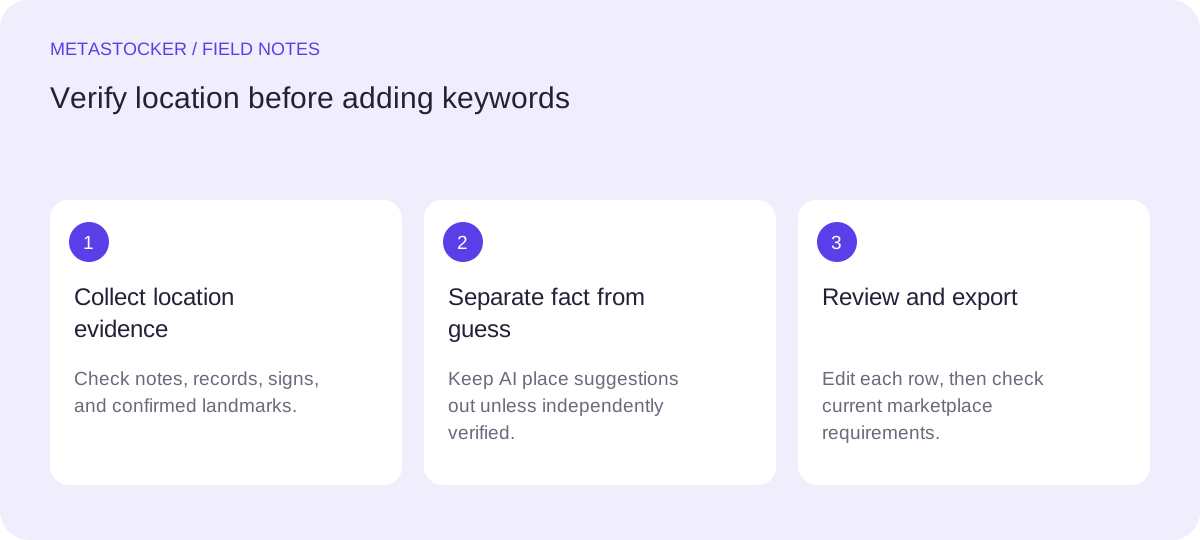
Start with the evidence, not the keyword list
Before writing metadata, record the strongest available evidence for each image. Direct documentation may include the photographer’s notes, a verified assignment brief, a GPS record, or a clearly readable official sign. A place recognized from personal knowledge can be useful, but pause when the visual evidence is ambiguous or the memory is uncertain.
A model’s location suggestion belongs in an investigation note, not automatically in the final title or keyword list. Old façades, paving stones, balconies, and street lamps occur in many cities. Similar visual character is not proof of a municipality, district, landmark, or country.
- Verified fact: a documented capture location or unambiguous place reference.
- Useful context: old street, historic architecture, European streetscape.
- Unverified guess: a model’s suggestion that the image resembles a named city.
Case one: a generic European old street
Imagine a hypothetical photograph showing a narrow cobbled street, worn plaster façades, shutters, and warm evening light. The photographer knows only that it was taken somewhere in Europe. There is no sign, GPS record, recognizable landmark, or travel note identifying the city.
The safe metadata describes the visible subject and the verified geographic level. For a platform requiring English metadata, suitable terms could include “old European street,” “historic architecture,” “cobblestone street,” “traditional façades,” “urban passage,” and “evening light.” Do not add “Prague,” “Krakow,” or another city simply because the scene feels characteristic of it.
A broad country keyword also needs evidence. If the country is not documented, leave it out. Location restraint does not make the image unusable; it prevents an attractive but unsupported interpretation from becoming a factual claim.
- Keep visual and architectural terms that are directly observable.
- Use regional wording only when the region is documented.
- Do not turn style recognition into a precise city claim.
Case two: a documented Krakow square
Now consider a different hypothetical image. The photographer’s notes and capture record identify the location as a specific square in Krakow, Poland. The architecture and visible layout are consistent with that record, but the image does not show every landmark clearly.
Here, the verified location can be useful metadata. A title might be “City square in Krakow, Poland at evening.” Keywords could begin with “Krakow,” “Poland,” “city square,” “European architecture,” and then continue with visible subjects such as “cobblestone,” “city buildings,” or “urban travel.” Put the most important terms early, and keep the complete list relevant to this particular image.
Do not add a landmark name unless the photographer has verified that landmark. A documented city does not automatically verify every building, event, neighborhood, or historical association visible in the frame. If a marketplace’s current rules request English descriptive metadata, keep the metadata in English even when the article or contributor interface is in another language.
- Use the documented city and country at the appropriate confidence level.
- Name a square or landmark only when that specific identification is verified.
- Check current portal rules for keyword limits and required fields.
Example metadata
Title: City square in Krakow, Poland at evening
Keywords: Krakow, Poland, city square, European architecture, cobblestone, city buildings, travel, urban scene, evening light
Case three: an unknown generated city
Suppose an image was generated by an AI system as an imaginary city scene. It contains a convincing old square, but there is no real-world capture location and no instruction establishing a named city. The image may support terms such as “fictitious city,” “imagined architecture,” “generated urban scene,” “fantasy streetscape,” or “conceptual city,” depending on the platform and the image’s actual content.
Do not assign Krakow, Paris, or another real location because the model produced familiar architectural signals. The correct distinction is between a real place represented in an image and a fictional place designed to look plausible. If the platform requires a particular disclosure or content classification, follow its current contributor guidance; those requirements can change.
- Describe the fictional nature when it is relevant to the asset.
- Avoid real city names used only as visual comparisons.
- Separate creation context from geographic location.
Use AI as a drafting assistant, not a location authority
MetaStocker’s local mode can analyze images in the visitor’s browser using supported local models. A generated city suggestion is still an inference, not independent verification. Review every proposed location term and remove anything that cannot be supported. Local model memory and downloaded browser cache are different: loading a model uses it for inference, while cached files may remain after unloading. Neither changes the need for human review.
For batches, provide only shared facts that truly apply to every file. “Photographs from a documented Krakow square” may be valid for a carefully selected batch; “European city” may be too broad or still unsupported for a mixed set. Extra tags should also be checked per file. Exact tag-count validation confirms a requested count, not factual accuracy.
The app can export formats for marketplaces, but exporting is not submission and does not guarantee acceptance. Before export, edit the title and keywords, inspect the final rows, and check the current contributor portal requirements. For Adobe Stock, use a conservative keyword count and keep the most important terms near the beginning. For Shutterstock, use accurate English metadata and relevant keywords. Documentary editorial captions require verified date and location; that requirement does not apply generally to commercial work.
- Treat AI place names as suggestions requiring evidence.
- Review batch context and extra tags for every file.
- Inspect exported rows and the current marketplace portal before upload.
Do not confuse marketplace metadata with Google indexing
Keywords entered for a stock marketplace help describe an asset inside that marketplace. They are not the same as making a photographer’s website appear in Google. Website image discovery depends on page context, image descriptions, and the site’s indexing setup; a marketplace keyword list does not guarantee crawling, indexing, traffic, or sales.
If the image is later displayed on your own website, write surrounding text and alternative text that accurately describe the image. For the generic street, that might mention an old European streetscape without naming a city. For the documented image, it may mention the verified Krakow square. For the generated scene, identify it as fictional when that matters to the reader.
- Keep marketplace keywords and website SEO tasks separate.
- Use precise surrounding text and alt text on your own site.
- Never promise rankings, downloads, or revenue from a location keyword.
Before you continue
- Identify the strongest evidence for the image’s location.
- Remove city, country, landmark, and district names that are only guesses.
- Use observable architectural or scene descriptors for an unverified street.
- Add Krakow or another place only when that specific location is documented.
- Label an AI-generated city as fictional or imagined when appropriate.
- Review AI suggestions, batch context, and extra tags per file.
- Keep marketplace metadata in the platform’s required language.
- Check current contributor rules before exporting or uploading.
- Inspect the final metadata rows; export is not submission or acceptance.
Sources and editorial approach
Prepared with AI assistance. Worked examples are illustrative. Automated checks do not replace checking the requirements of your stock platform. How these guides are made.