 MetaStocker
Titles & keywords
How to Use Mood Keywords for an Empty Bench Photo
Start with the photographer’s shoot note: the image shows an empty bench at dusk. That is the evidence available for this example. The note does not identify the location, bench material, weather, owner, people, or the photographer’s intended emotion. This distinction matters when you add mood keywords. A stock buyer may search for concepts such as solitude or reflection, but a keyword should not turn an empty scene into a diagnosis of sadness or a fictional narrative.
The practical goal is a metadata set that describes what is visible and adds only a cautious, useful association. The same discipline works across stock marketplaces: write a clear title, put the strongest factual terms first, then add a small number of defensible concepts. Review every word for this individual image rather than filling the field with generic emotional language.
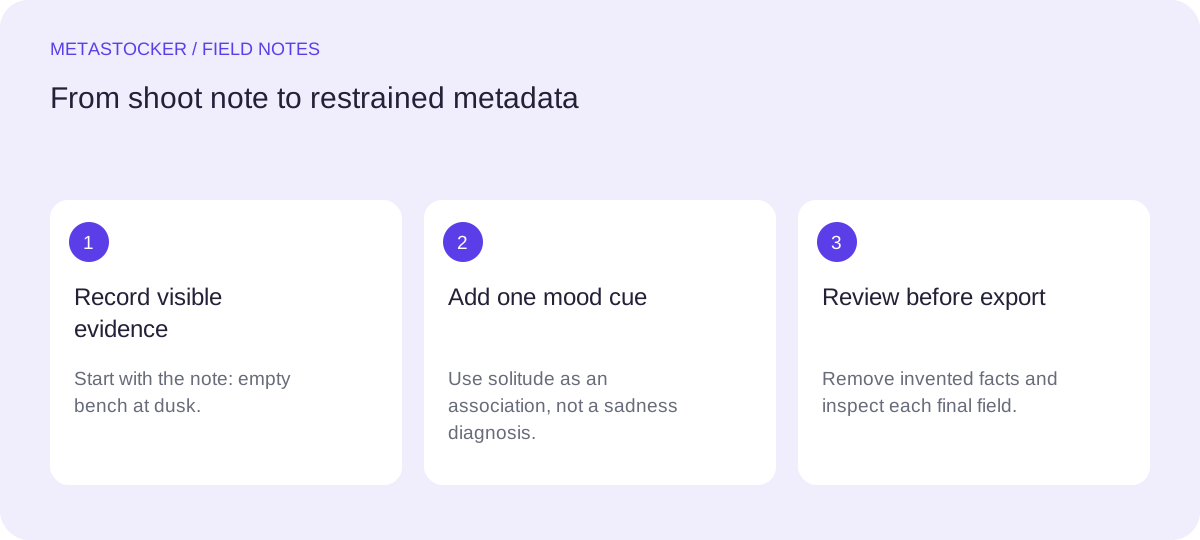
Separate evidence from interpretation
Make two columns before writing metadata. In the evidence column, record only what the shoot note and image support: empty bench, dusk, and any plainly visible composition such as an outdoor-looking scene if that is genuinely apparent. Do not add a park, city, wood, metal, rain, autumn, loneliness, or a named country unless the supplied facts or image establish it.
In the interpretation column, place possible associations. Solitude can describe the visual idea of an unoccupied seat, but it remains a concept, not proof of the photographer’s or a viewer’s emotional state. “Sad person,” “depression,” and “abandoned property” cross the line because no person, diagnosis, ownership, or backstory is established. Use the narrower concept that helps discovery without pretending to know more.
- Factual: empty bench, dusk, outdoor scene only when supported.
- Cautious concept: solitude, reflection, quiet.
- Unsupported story: sadness diagnosis, abandonment, loneliness of a named person.
Shoot note: “Empty bench at dusk.”
Supported starting terms: empty bench, dusk, evening, seat, quiet scene.
Possible restrained concept: solitude.
Do not add: sad person, abandoned park, wooden bench, city location.
Build the title from the strongest facts
Write a sentence-like title that identifies the subject and time of day. The title should not be a pile of keywords or a dramatic caption. A useful example for this assignment is: “Empty bench at dusk suggesting quiet solitude.” “Suggesting” signals an interpretation while keeping the visible subject first.
If a marketplace requires English metadata, keep the title and keywords in English even when your working notes or blog language are Russian. Adobe’s guidance says the metadata language must match the contributor account language, recommends the most important terms first, and permits up to 49 keywords. Its CSV guidance currently gives a 70-character title limit, so count the title for that workflow and check the current contributor screen before upload.
- Lead with the object: empty bench.
- Add the supported time cue: dusk.
- Use one restrained conceptual phrase, not a diagnosis.
- Keep the title within the applicable platform limit.
Title: Empty bench at dusk suggesting quiet solitude
Length: 44 characters
Decision: the object and dusk lead; “suggesting” prevents the mood phrase from posing as a fact.
Choose mood keywords conservatively
Treat mood terms as optional extensions of the image, not replacements for description. Start with concrete terms such as empty bench, bench, seat, dusk, evening, and outdoor scene only if the scene is visibly outdoor. Then consider quiet, solitude, stillness, and reflection. These terms express plausible associations with an unoccupied bench without asserting a person’s mental condition.
Avoid near-duplicates and emotional escalation. Adding lonely, sad, grief, depression, heartbreak, abandoned, and isolation would make the set more dramatic, but it would not make it more accurate. “Solitude” is already enough to capture the intended conceptual direction in this example. A mood keyword should earn its place by being relevant to this particular frame.
- Prefer one or two mood concepts over a chain of synonyms.
- Remove terms that require an unseen person, event, or history.
- Do not use a mood term merely because it sounds marketable.
Keep: quiet, solitude, stillness, reflection.
Questionable or unsupported here: grief, depression, abandoned, lonely person, heartbreak.
Worked example: an 18-keyword set
Here is a hypothetical example, not a measured result or a real customer outcome. The proposed set contains 18 English keywords and keeps the evidence-to-concept balance visible. The first terms identify the subject and lighting condition; the later terms describe atmosphere or association.
The tradeoff is deliberate. “Dusk” and “evening” overlap, but they are not identical: one names the light or time transition, while the other is broader. If the image does not visibly support “outdoor scene,” remove it. If the frame does not communicate stillness, remove that concept too. Accuracy beats reaching an arbitrary maximum.
- Concrete object and time: 1–6.
- Atmosphere and restrained concepts: 7–18.
- Delete any term the individual frame cannot support.
1. empty bench
2. bench
3. seat
4. dusk
5. evening
6. outdoor scene
7. quiet
8. solitude
9. stillness
10. reflection
11. waiting
12. pause
13. calm
14. twilight
15. empty space
16. tranquil
17. contemplative
18. peaceful
Adapt the set to each marketplace
Do not assume one keyword rule applies everywhere. Shutterstock’s current guidance calls for 7 to 50 relevant keywords, at least one category, and English descriptive metadata. It also says keywords should be tailored to the individual work and should not be repeated or irrelevant. Adobe allows up to 49 keywords and emphasizes the first ten, so the first ten in the example should remain the strongest factual and defensible conceptual terms.
Marketplace requirements can change. Before submitting, check the contributor portal and the current item-specific rules. If you use a CSV, the file mapping is a separate operational concern: assets must be uploaded first, and filenames including extension and case must match. Inspect the imported metadata in the portal. A valid-looking keyword list or CSV is not proof of acceptance.
- Check current limits, language, category, and portal requirements.
- Keep the strongest terms in the first ten where ordering matters.
- Inspect imported fields before exporting or submitting.
Adobe-oriented order: empty bench, bench, seat, dusk, evening, outdoor scene, quiet, solitude, stillness, reflection.
If the platform’s current rules differ, revise the count or order before submission.
Use a generator as a draft, not a verdict
MetaStocker’s local mode can generate draft metadata in the visitor’s browser using a local model, with no AI server inference for that mode. The default local model is Gemma 4 E2B, and other listed local models include Gemma 4 E4B and Qwen3.5 2B. A first model download needs internet; loaded model memory is different from browser cache, and cache retention is not a promise of permanent offline availability.
For this bench image, enter the shoot note as factual context and ask for restrained mood language. Review each generated tag against the evidence before exporting. Extra tags can be placed at positions, but they still need per-file review. The app validates a requested tag count, not factual accuracy, and its exporter does not upload, submit, guarantee acceptance, or embed metadata into the original. Keep only the ready rows.
- Provide the note: “Empty bench at dusk.”
- Reject invented locations, materials, people, diagnoses, and ownership.
- Edit the final title and keywords before export.
Draft instruction: “Describe an empty bench at dusk. Add at most one cautious mood concept. Do not infer location, material, people, ownership, or mental state.”
Before you continue
- Record the shoot note before adding interpretation.
- Put the object and dusk near the beginning of the title and keyword list.
- Use solitude or a similar concept only as a cautious association.
- Remove diagnoses, identities, ownership, materials, locations, and invented stories.
- Check the current marketplace language, count, category, and portal rules.
- Review every generated field and inspect imported CSV metadata before submission.
Sources and editorial approach
Prepared with AI assistance. Worked examples are illustrative. Automated checks do not replace checking the requirements of your stock platform. How these guides are made.