 MetaStocker
Titles & keywords
How to Shorten a Stock Title Without Losing the Subject
A long stock title often contains useful facts, but it can bury the subject under decorative wording and repeated details. The practical goal is not to remove information at random. It is to keep the facts that identify the image, put the strongest terms first, and produce a short sentence that a buyer can understand quickly. Adobe currently recommends brief, clear titles, ideally under 70 characters, while Shutterstock advises using a descriptive sentence or phrase rather than a list of keywords. Marketplace rules can change, so check the current contributor portal before submitting.
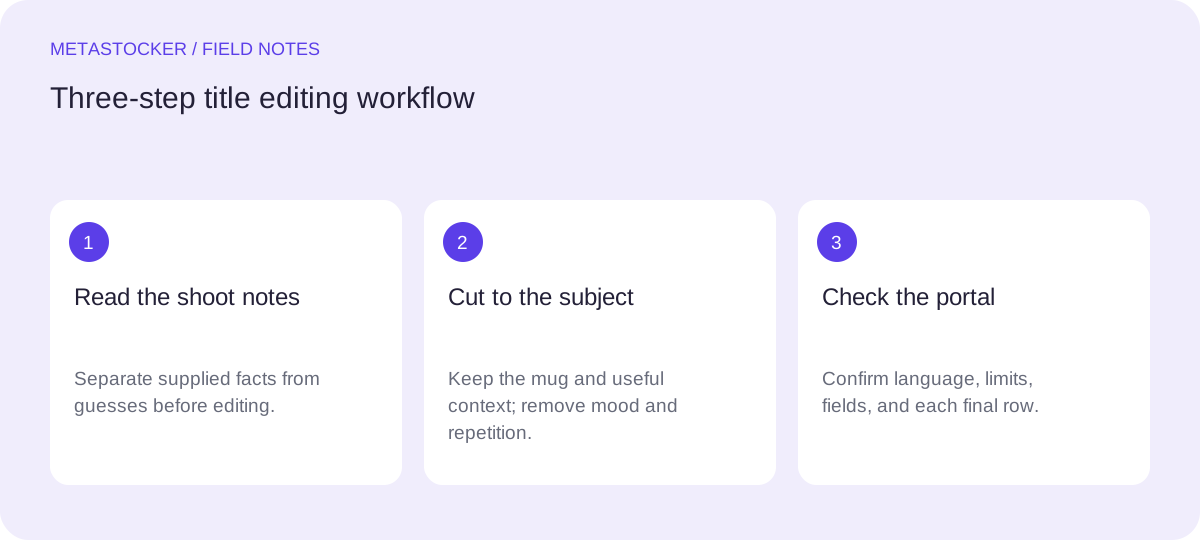
Start with verified shoot notes
Before editing, separate observed or supplied facts from assumptions. For this hypothetical example, the photographer’s shoot notes say: one red ceramic coffee mug, black coffee, a rustic wooden desk, bright window light, no people, no logos, and no location supplied.
These notes establish what may safely appear in the title. They do not establish a café, a particular country, a specific morning, ownership, or a mood such as relaxation. A title should not add those ideas merely because they seem plausible from pixels.
- Write down the main object before writing keywords.
- Mark unsupported details as unavailable.
- Do not infer identity, ownership, location, species, or ingredients beyond the notes.
Shoot notes for this hypothetical example: one red ceramic coffee mug, black coffee, rustic wooden desk, bright window light; no people, logos, or location supplied.
Find the subject and supporting context
A useful title usually has a simple structure: main subject first, then the most helpful context. Ask what a buyer would need to distinguish this file from another image of the same object.
For the example, the subject is the red ceramic coffee mug. The black coffee, wooden desk, and window light add context, but not all of them deserve equal space. The word “cozy” is an interpretation, so it is removed. “Morning” is also removed because the notes describe bright window light, not a verified time of day.
- Subject: red ceramic coffee mug.
- Context: black coffee, wooden desk, window light.
- Remove mood words unless the image or notes clearly support them.
Decision: retain the mug, ceramic material, desk, and window light; omit “cozy,” “rustic” if space is tight, and “morning” unless it was supplied.
Worked example: cut the draft
Here is the complete hypothetical edit. The original draft is a 100-character sentence: “Cozy red ceramic coffee mug filled with black coffee on a rustic wooden desk beside a bright window.” It is understandable, but it spends characters on mood and extra description before reaching the practical search terms.
The edited title is: “Red ceramic coffee mug on wooden desk in window light.” It keeps the subject, material, surface, and lighting context. It does not claim a location, a time of day, or a mood. The result is concise and reads as a sentence-like phrase rather than a keyword pile.
- Original: Cozy red ceramic coffee mug filled with black coffee on a rustic wooden desk beside a bright window.
- Edited: Red ceramic coffee mug on wooden desk in window light.
- Tradeoff: “black coffee” and “rustic” are dropped to keep the core description compact.
Edit test: if removing a word makes the image harder to identify, keep it; if it only adds emotion or repetition, remove it.
Order terms for marketplace use
Put the most important terms near the beginning: subject first, then material or distinguishing context. This helps a reviewer or buyer understand the file before reaching the end of the title. Adobe’s guidance gives particular attention to the first ten terms and permits up to 49 keywords separately, so the title does not need to carry every searchable concept.
A title is not a keyword field. Avoid turning it into “mug, coffee, desk, wood, window, red.” Use one clear phrase, then place additional accurate terms in the platform’s keyword field. Do not repeat the same idea in several forms just to fill space.
- Begin with the primary object.
- Use one language matching the contributor account or platform requirement.
- Keep keywords separate from the title and make them file-specific.
Title order: red ceramic coffee mug → wooden desk → window light.
Check language and platform limits
The same edit may need a platform-specific check. Adobe’s current guidance says titles should ideally be under 70 characters and metadata should match the Contributor Account language. Shutterstock requires English descriptive metadata in its cited guidance and recommends 7 to 50 relevant keywords. Other marketplaces can use different fields and limits.
If your Russian-language blog or notes explain the workflow, that does not mean the marketplace metadata should be Russian. For a platform requiring English, the example remains “Red ceramic coffee mug on wooden desk in window light.” Always inspect the current upload screen or contributor portal before final submission.
- Confirm the current title limit.
- Confirm the required metadata language.
- Check whether the platform separates title, description, and keywords.
English marketplace metadata example: Red ceramic coffee mug on wooden desk in window light.
Use a generator as an editable first pass
MetaStocker can generate local metadata in the visitor’s browser using its local models, but generated text still needs editorial checking. Local execution is model inference on the visitor’s device; it is not server-side writing. The first model download needs internet, and downloaded browser cache is different from a model loaded in active memory.
For this workflow, enter the shoot notes as context, generate a title, and compare it with the notes. Remove any guessed location, person, brand, material, or mood. Review each file individually before exporting. The app’s exporter creates formats such as Adobe, Envato, Shutterstock, and Freepik CSV, but it does not upload, submit, guarantee acceptance, or embed metadata into the original file.
- Give the generator factual context, not blanket tags for a mixed batch.
- Review the editable result against the image and shoot notes.
- Export only rows that are ready for the target marketplace.
Prompt context: one red ceramic coffee mug with black coffee on a rustic wooden desk in bright window light; no people, logos, or location supplied.
Before you continue
- Identify the subject from the image and supplied shoot notes.
- Remove unsupported mood, time, place, identity, ownership, and brand claims.
- Place the strongest subject terms first.
- Rewrite the title as a concise descriptive phrase, not a keyword list.
- Check the current platform limit and required metadata language.
- Review title and keywords per file before exporting or submitting.
Sources and editorial approach
Prepared with AI assistance. Worked examples are illustrative. Automated checks do not replace checking the requirements of your stock platform. How these guides are made.