 MetaStocker
Titles & keywords
Metadata for a Flat Gardening Vector Icon Collection
Preparing metadata for a gardening icon collection is more than listing words such as “plant” and “garden.” A contributor needs to identify what is actually drawn, explain the visual style, and avoid promising file properties that the submitted asset does not have. This guide uses a hypothetical flat collection of editable vector icons: a hand trowel, watering can, seed packet, garden gloves, potted sprout, rake, and wheelbarrow. The collection also has a PNG preview for display. The goal is to create useful English metadata while keeping the vector deliverable, preview image, and unsupported format claims clearly separate.
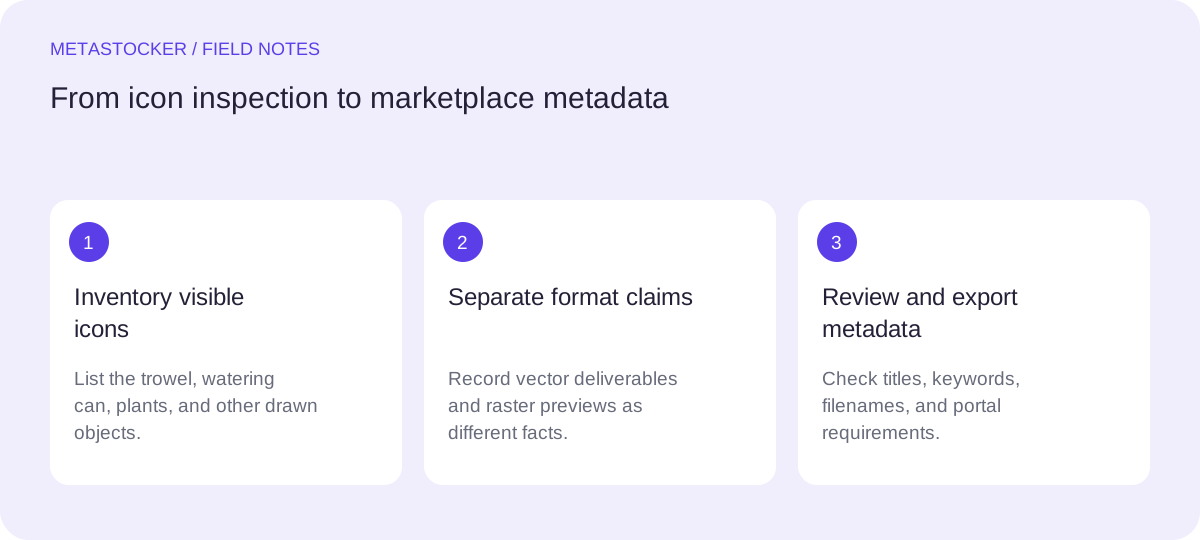
1. Inspect the collection before writing
Open the editable source and review every icon, not just the preview sheet. Record the objects that are visibly present, whether the collection is isolated or arranged as a pattern, and whether the style is flat, outlined, geometric, colorful, or monochrome.
For this example, the accurate visual description is a flat gardening icon collection with seven separate tools and plant-related symbols. Do not add vegetables, greenhouse equipment, landscaping scenes, or organic textures unless they are actually included. A preview may show all icons together, but that does not turn the asset into a seamless pattern or a single raster illustration.
- List visible objects before choosing keywords.
- Describe composition and style only when they are evident.
- Treat the preview as evidence of appearance, not proof of every deliverable format.
2. Separate asset facts from preview facts
Metadata should describe the item a buyer can receive. If the main deliverable is an editable vector file, state that only when the submitted package really contains an editable vector format supported by the marketplace or product listing. A PNG or JPEG preview demonstrates how the icons look; it does not prove that the preview itself is editable.
Avoid claims such as “SVG included,” “AI compatible,” “fully editable,” or “print-ready” unless those claims are true for the actual package and allowed by the platform. If an .ai source is provided, remember that a metadata tool may need a readable preview to analyze it; the tool cannot make an unreadable source reliable.
- Use “editable vector icon collection” only for the vector deliverable.
- Use “raster preview” for the display image when that distinction matters.
- Do not infer file formats from pixels or from a thumbnail.
Deliverable fact: seven editable vector icons.
Preview fact: one raster preview sheet showing the icons together.
Do not claim: “PNG icons are editable vectors.”
3. Build a descriptive title
Put the central subject and format near the beginning, while keeping the title natural rather than turning it into a keyword list. A useful title for this example is “Flat Gardening Tools and Plant Vector Icon Collection.” It identifies the theme, style, and asset type without claiming that the preview is the product.
If a platform imposes a title limit, check its current contributor guidance before exporting. Adobe’s CSV guidance currently states a 70-character title limit, while its general keyword guidance allows up to 49 keywords. Limits and upload rules can change, so validate the current portal requirements. A title should remain understandable even when the marketplace displays it without the keyword field.
- Start with the main subject: gardening tools and plants.
- Mention “vector” only when the deliverable is vector.
- Prefer a readable phrase over a comma-separated keyword pile.
Flat Gardening Tools and Plant Vector Icon Collection
4. Choose relevant keywords by priority
Begin with the most important concepts: gardening, tools, plant, icon, vector, flat design, and collection. Then add only terms supported by the artwork, such as watering can, trowel, rake, gloves, seed packet, potted plant, and wheelbarrow. Keep singular and plural choices purposeful instead of repeating near-duplicates.
The first terms deserve special care on services that give them greater attention. A keyword generator can suggest possibilities, but the contributor must remove terms that do not apply to every file or to the collection as a whole. If the platform requires English metadata, use English terms even when the article or interface is in another language. For Adobe, metadata language must match the contributor account, so check that account setting before export.
- Prioritize subject, asset type, style, and clearly visible objects.
- Remove unrelated terms such as vegetable, greenhouse, landscape, or farming if absent.
- Check the current marketplace keyword range and category rules.
gardening, garden tools, plant, vector, icon, flat design, collection, watering can, trowel, rake, garden gloves, seed packet, potted plant, wheelbarrow, editable
5. Worked example: turn one collection into usable metadata
Suppose the source contains seven separate icons in a consistent flat style. The watering can has a handle and spout, the trowel is hand-sized, the seed packet has a simple leaf symbol, and the remaining icons are a glove pair, sprout in a pot, rake, and wheelbarrow. The preview is a rectangular PNG sheet on a light background.
The decision is to describe the collection rather than invent a scene. “Flat gardening tools and plant vector icon collection” is more accurate than “farm landscape illustration.” “Colorful” is appropriate only if the artwork visibly uses several colors. “Isolated” should be used only if the individual icons are presented without a surrounding scene or background that changes their intended use.
- Title: Flat Gardening Tools and Plant Vector Icon Collection.
- Style terms: flat design, simple shapes, colorful, only if visibly supported.
- Object terms: watering can, trowel, seed packet, gloves, potted sprout, rake, wheelbarrow.
- Format term: editable vector, only for the actual vector package.
Title: Flat Gardening Tools and Plant Vector Icon Collection
Description: Seven separate flat icons for gardening and plant-related projects, including a watering can, trowel, seed packet, gloves, potted sprout, rake, and wheelbarrow.
Keywords: gardening, garden tools, plant, vector, icon, flat design, watering can, trowel, seed packet, garden gloves, potted plant, rake, wheelbarrow, collection
6. Review, export, and verify the result
If you use MetaStocker’s local generator, treat its output as an editable draft. Its local models run in the visitor’s browser, and the app can export marketplace-oriented CSV formats, but it does not upload or submit the files, embed metadata into the original artwork, or guarantee acceptance. Review each row before exporting, especially when a batch contains different icons.
For CSV workflows, filenames must match the uploaded assets exactly where the platform requires that mapping, including extension and case. Uploading assets before importing a CSV is part of Adobe’s stated workflow, and the resulting metadata should be inspected in the contributor portal. Shutterstock guidance also emphasizes an accurate descriptive phrase and relevant, non-repeated keywords. Finally, check the current contributor portal because marketplace policies and field limits change.
- Compare every title and keyword list with the actual icon.
- Confirm filename, extension, capitalization, and required category fields.
- Inspect imported metadata in the marketplace portal.
- Keep the original vector source separate from the preview and exported CSV.
Before you continue
- I named only objects visible in the gardening collection.
- I distinguished the editable vector deliverable from the raster preview.
- I used a natural title and prioritized the most important terms.
- I removed unsupported format, scene, and subject claims.
- I checked the target marketplace’s current language, limits, and category rules.
- I reviewed generated metadata per file before exporting or importing it.
Sources and editorial approach
Prepared with AI assistance. Worked examples are illustrative. Automated checks do not replace checking the requirements of your stock platform. How these guides are made.