 MetaStocker
Local AI
How to Unload or Delete MetaStocker’s Local AI Model
MetaStocker can run supported vision and thinking models inside your browser through WebGPU workers. That makes the model useful for local metadata work, but it also creates two different cleanup decisions: unloading and deleting. Unloading stops keeping the model active in worker memory while retaining its downloaded browser files. Deleting removes the cached model files, so using that model again requires another download. Neither action removes photos, videos, or model files stored elsewhere on your device. This guide explains how to choose the right action, perform it, and confirm what changed without assuming that browser storage is permanent or that every device has enough memory for every model.
Understand memory versus cached files
An active model occupies working memory while MetaStocker is using it. Unloading releases that active model from memory, which is useful when you have finished a batch or want to reduce pressure before another browser task. The downloaded model remains in the browser’s local cache, so the next use may avoid repeating the full download, subject to normal browser storage behavior.
Deleting is a stronger cleanup step. It removes the browser’s stored model files for the selected local model. This can recover cached storage, but the model must be downloaded again before it can run. Browser cache can also be evicted by the browser, so retaining files is not a guarantee of permanent availability or offline use.
- Unload: active memory is released; cached model files are retained.
- Delete: cached model files are removed; a future run needs a new download.
- Neither action deletes files in your Downloads folder, photo library, or another application.
Example: If you are switching from image metadata work to video editing for ten minutes, unload the model. If you are clearing browser storage before a long trip, delete it only if you accept downloading it again later.
Unload after finishing a session
Use unloading when your immediate goal is to stop the model occupying active worker memory. Finish or save any metadata decisions first, because MetaStocker’s results are not promised to persist after a tab closes. Export only rows you have reviewed and are ready to use; exporting does not upload files or write metadata into the original assets.
In the local model controls, use the unload action for the loaded model. Wait for the interface to reflect that the model is no longer loaded, then avoid starting another generation until you actually want to reload it. If you choose the model again later, the app may load it from retained browser storage, although browser storage behavior is not guaranteed.
- Review generated titles, descriptions, and tags before unloading.
- Export ready rows before closing the tab.
- Treat unloading as a memory action, not a file-deletion action.
Delete a cached model deliberately
Delete the local model when retaining its browser files is no longer worthwhile—for example, when you are finished testing a model or need to reclaim browser storage. Select the delete-browser-files action for the model you intend to remove and read the interface state carefully before confirming.
Deleting the cache does not uninstall the browser, remove MetaStocker, or erase your source media. It only addresses the model files stored by the browser for local use. The next time you select that model, plan for a fresh download and an internet connection. The exact storage available and eviction behavior depend on the browser.
- Choose the exact model before deleting its files.
- Expect another download on the next use.
- Keep source media backups in their normal folders; cache deletion does not manage them.
Worked example: choosing the safer cleanup
Example, not a measured result: Mira has a folder of 18 travel photographs and uses MetaStocker’s default Gemma E2B local model. She generates draft metadata, checks whether each description matches the visible image, and exports the accepted rows. She is about to open a memory-heavy design application but expects to edit another batch tomorrow.
Her best choice is unload. The work is exported, the active model is no longer needed during design work, and retaining the browser files avoids intentionally forcing a new download tomorrow. She does not delete the model because storage recovery is not her current priority.
Now change one fact: Mira is testing several models and wants to remove the Gemma files after comparing them. In that case, she can delete Gemma’s browser model files after exporting reviewed results. When she later chooses Gemma again, she should expect to download it again. In both cases, she leaves the original photographs untouched.
- Decision rule: need memory released now? Unload.
- Decision rule: need cached storage reclaimed and accept a new download? Delete.
- Decision rule: need to remove originals? Use the operating system or file manager separately; the model cleanup controls do not do that.
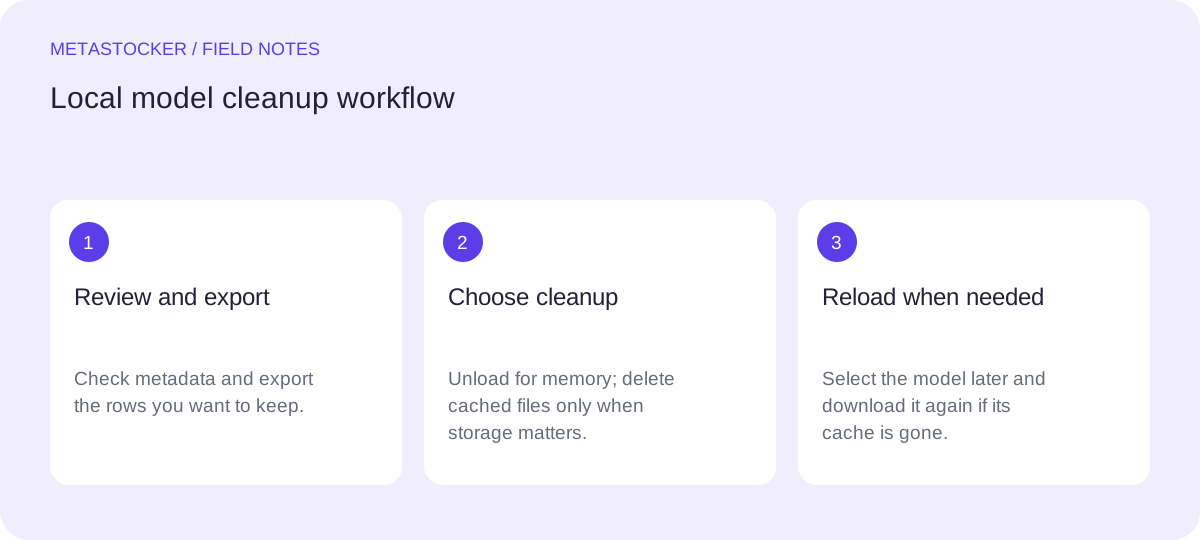
Session finished → review results → export accepted rows → unload for memory, or delete for cache cleanup → reload and download later only if needed.
Avoid common cleanup mistakes
Do not treat a browser cache as a second copy of your photographs. Local mode keeps photos, prompts, and results on the device during processing, while model downloads contact external hosts. The model cache is separate from active memory and separate from your personal media files.
Do not assume WebGPU support alone means a model will fit. A compatible browser, GPU, and driver are required, and available memory still matters. If you work with parallel local threads, each thread can load its own model copy; begin with one thread and test additional threads only when your device handles them reliably.
Do not expect deletion to improve metadata quality or guarantee faster work later. It is a storage decision. Also remember that local inference is performed in the visitor’s browser; writing this guide on a server is unrelated to where your local model runs.
- Keep one local thread as the starting point.
- Do not confuse model cleanup with source-file cleanup.
- Do not claim that a retained cache will always survive browser eviction.
Verify the state before you continue
After unloading, check that the model is shown as unloaded rather than merely idle. After deletion, check that the browser model files are no longer shown as retained, if the interface provides that state. If the next run offers a download, that is consistent with deletion or with ordinary browser cache eviction.
Before regenerating, confirm the selected model and consider whether the batch context contains only facts that apply to every file. Mixed batches need per-file review. MetaStocker validates a requested tag count, but that does not prove that every tag is accurate or relevant.
Finally, inspect the contributor portal rules when exporting marketplace metadata. CSV output is not automatic submission or acceptance, and platform requirements can change. Cleanup should happen after you preserve the reviewed output you actually need.
- Confirm unloaded and deleted states separately.
- Expect a download prompt after cache deletion.
- Keep reviewed exports outside the browser workflow.
- Check current marketplace requirements before upload.
Before you continue
- I know whether I need to release active memory or remove cached files.
- I exported and reviewed any metadata I want to keep.
- I selected the intended model before unloading or deleting.
- I understand that deletion requires a future download.
- I did not expect model cleanup to delete my original media.
- I started with one local parallel thread if memory was a concern.
- I checked current contributor requirements before any later upload.
Sources and editorial approach
Prepared with AI assistance. Worked examples are illustrative. Automated checks do not replace checking the requirements of your stock platform. How these guides are made.