 MetaStocker
Contributor workflow
Keep Stock Crops Distinguishable with Titles and Filenames
When three stock files come from one fruit still life, the main risk is not that they share a subject. The risk is making them indistinguishable. A buyer searching for a wide composition should not receive a title that describes a close crop, and a contributor should be able to identify every row without opening all three files. This guide uses one concrete example: three crops from the same fruit-still-life shoot, prepared as separate stock assets. The photographer’s supplied shoot note says only that the subject is a fruit still life and that there are three crops. It does not identify particular fruits, materials, location, ownership, or people, so none of those details are added.
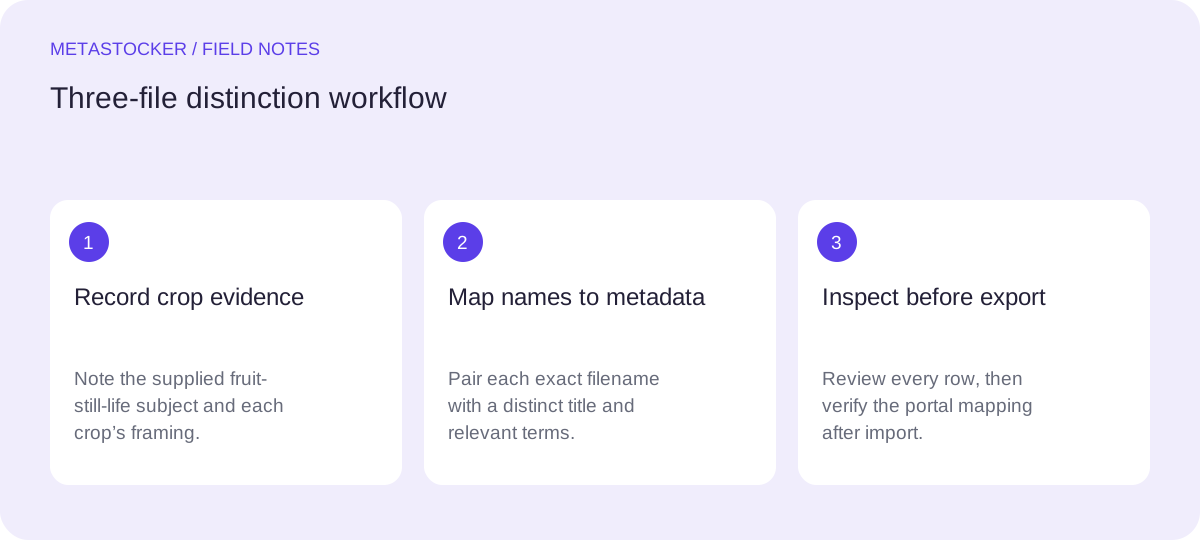
Start with the visual difference
Treat each crop as its own asset, but let the shared subject remain stable. First write down what is actually different: framing, orientation, negative space, and the part of the arrangement that is visible. Do not turn a visual impression into an unsupported ingredient list. If the shoot notes do not name apples, pears, citrus, or any other fruit, use the broader phrase fruit still life.
The goal is a title that helps a buyer distinguish the files at a glance. Terms such as wide composition, square crop, and vertical close-up describe the supplied variants without claiming a different scene or a new shoot. Use the same factual core only where it remains true.
- Asset 1: wide horizontal crop with more surrounding space.
- Asset 2: square crop showing a tighter central arrangement.
- Asset 3: vertical close crop emphasizing a narrow detail area.
Shoot note: fruit still life; three crops.
Allowed shared subject: fruit still life.
Variant evidence: wide horizontal, square, vertical close crop.
Make filenames carry the variant
A filename should be readable, stable, and different enough to prevent accidental row swaps. Put the shared subject first, then the crop identifier. Use lowercase and a consistent separator if your own filing system allows it. The extension is part of the filename when a platform maps CSV rows to uploaded files.
For this example, the names fruit_still_life_wide.jpg, fruit_still_life_square.jpg, and fruit_still_life_vertical_close.jpg make the three choices visible in a file list. Avoid vague names such as final1.jpg, edited.jpg, or image03.jpg. Also avoid calling a crop before or after unless the edit genuinely represents that stage; the assignment is to keep edited variants distinguishable, not to invent a chronology.
- Keep the shared subject phrase consistent.
- Use one unambiguous crop word per file.
- Check spelling and extension character by character.
fruit_still_life_wide.jpg
fruit_still_life_square.jpg
fruit_still_life_vertical_close.jpg
Write titles that are distinct, not keyword piles
A title should read like a concise description, not a row of search terms. For the three files, keep the subject and vary the composition phrase. The titles below are examples for this assignment, not measured search results or a guarantee of acceptance.
The crop words do useful work: they tell the buyer why these are separate assets. Do not add color, species, season, kitchen, studio, luxury, or editorial claims unless the photographer’s notes or the image evidence support them. If a target marketplace has current title or language rules, check its contributor portal before submission. Adobe’s current guidance emphasizes concise, accurate titles and relevant keywords, with the account language used consistently.
- Wide Fruit Still Life Composition
- Square Crop of Fruit Still Life
- Vertical Close Crop of Fruit Still Life
fruit_still_life_wide.jpg → Wide Fruit Still Life Composition
fruit_still_life_square.jpg → Square Crop of Fruit Still Life
fruit_still_life_vertical_close.jpg → Vertical Close Crop of Fruit Still Life
Build keywords around each file
Shared keywords may be appropriate when they describe all three files, but variant terms should be assigned selectively. For the wide file, composition and surrounding space are relevant. For the square file, square crop and centered composition may be relevant only if visible. For the vertical file, vertical composition and close crop describe the actual format and framing.
Keep the list relevant rather than filling a quota. Adobe allows up to 49 keywords, but a larger list is not automatically better. Put the most important terms early, and remove repeated or unsupported words. Do not use personal names, brands, guessed identities, or invented fruit species. If the platform requires English metadata, the Russian article’s examples still remain in English.
- Shared: fruit, still life, food, composition, arrangement.
- Wide-only: wide composition, surrounding space, horizontal.
- Square-only: square crop, centered composition.
- Vertical-only: vertical composition, close crop.
Wide keywords: fruit still life, fruit, food, composition, arrangement, wide composition, surrounding space, horizontal
Square keywords: fruit still life, fruit, food, composition, arrangement, square crop, centered composition
Vertical keywords: fruit still life, fruit, food, composition, arrangement, vertical composition, close crop
Map the rows before export
Create a simple review table before exporting a CSV. The filename is the key; the title and keywords must describe that exact crop. This is a useful point for a local metadata generator such as MetaStocker: load the three files, provide only the shoot-note context, and review each editable result individually. A batch description should contain facts shared by the batch, not blanket tags that become wrong for one crop.
MetaStocker’s local mode runs inference in the visitor’s browser and does not automatically upload or submit the CSV. If you use its exporter, export only rows that you have checked. Its exact requested tag count validation does not prove that the tags are accurate. The app accepts images, but the final responsibility for crop identity and metadata remains with the contributor.
- Match one filename to one crop.
- Compare title wording with the visible framing.
- Remove a keyword that fits another crop but not this one.
- Export only after every row is ready.
Filename | Title | Crop-specific terms
fruit_still_life_wide.jpg | Wide Fruit Still Life Composition | wide composition, surrounding space, horizontal
fruit_still_life_square.jpg | Square Crop of Fruit Still Life | square crop, centered composition
fruit_still_life_vertical_close.jpg | Vertical Close Crop of Fruit Still Life | vertical composition, close crop
Verify the upload in the portal
For Adobe CSV work, upload the assets before importing the CSV, and make the filenames—including extension and case—match exactly. After import, inspect the resulting metadata in the contributor portal. That check catches a swapped row even when the CSV itself is syntactically valid.
Marketplace requirements can change, so use the current portal instructions for the destination and confirm its language, title length, keyword range, category, and file-mapping rules. A correct mapping improves editorial clarity; it does not guarantee acceptance, indexing, sales, or marketplace ranking. Google website image indexing is a separate matter from internal stock search: descriptive surrounding text and alt text belong to a website workflow, not automatically to a stock CSV.
- Upload the three named assets first.
- Compare case, spelling, and extensions.
- Inspect imported titles and keywords per file.
- Correct a mismatch before submission.
Before you continue
- Record only the shoot facts you actually have.
- Give every crop a unique, readable filename.
- Keep titles concise and composition-specific.
- Use English metadata when the destination requires it.
- Assign crop-specific keywords per file.
- Review editable rows before exporting.
- Check the current contributor portal and inspect imported metadata.
Sources and editorial approach
Prepared with AI assistance. Worked examples are illustrative. Automated checks do not replace checking the requirements of your stock platform. How these guides are made.